
12 Simple and Free Customer Survey Form Builders | Wotech Electronics
Vũ Khôi
Tác giả tại Wotech Electronics Blog
12 Simple and Free Customer Survey Form Builders
Vu Khoi
Author at Wotech Electronics Blog
Everyone knows that surveys are among the most effective tools for gathering customer feedback and comments. However, creating and distributing customer survey forms is no easy challenge. Without customer survey form builders, it would take you days, even weeks, to create the perfect survey. And even after investing all that time, a do-it-yourself survey may still not be as polished as a competitor's. That is why your business really needs effective tools for building customer survey forms.
And the good news is that many software tools have now been created to support businesses for free, giving you plenty of options to choose from.
In the article below, we will introduce 11+ free customer survey form builders, and also answer the questions: What is a customer survey form? And what customer survey questions are commonly used?
What Is a Customer Survey Form?
A customer survey form is a tool that lets a business ask questions and receive answers from customers. It is part of the business's customer management and care process, aimed at collecting customers' feedback and comments on product quality, employee service attitude, and customer satisfaction. Survey results can help the business recognize its existing strengths and flexibly address the weaknesses that still remain.

Customer Survey Form Questions
Before drafting customer survey questions, the business needs to take the following steps:
Define the Purpose of the Customer Survey Form
Defining the purpose of the customer survey helps the business decide on its next steps. What is the purpose of the survey? Customer needs, or customer satisfaction with the product? Then decide on the question format that fits the survey's purpose. This activity also prevents the business from ending up with too little or too much data during the survey.
Determine the Question Format and Question Order
Do you want a multiple-choice survey, or one where customers freely write their thoughts? Typically, many businesses use both formats in one survey. For easy questions, the business offers ready-made yes/no answers; for more complex questions, it places them at the end and lets customers write freely.
Here are some sample ready-made questions you can refer to:
- Are you satisfied with the company's products?
Answer options: Yes or No
- How would you rate the service attitude of our sales staff?
Answer options: Very satisfied / Satisfied or Not satisfied
- Did you have difficulty finding the product?
Answer options: Hard / Easy / Average
- Did you encounter any obstacles while purchasing the product?
Answer options: Yes or No
If yes, leave a blank section for the customer to write in.
- Will you continue to support us next time?
Answer options: Yes or No
- What could we improve to provide you with better service?
Answer options: Leave blank for the customer to fill in
- What do you like most about our product?
Answer options: Leave blank for the customer to fill in
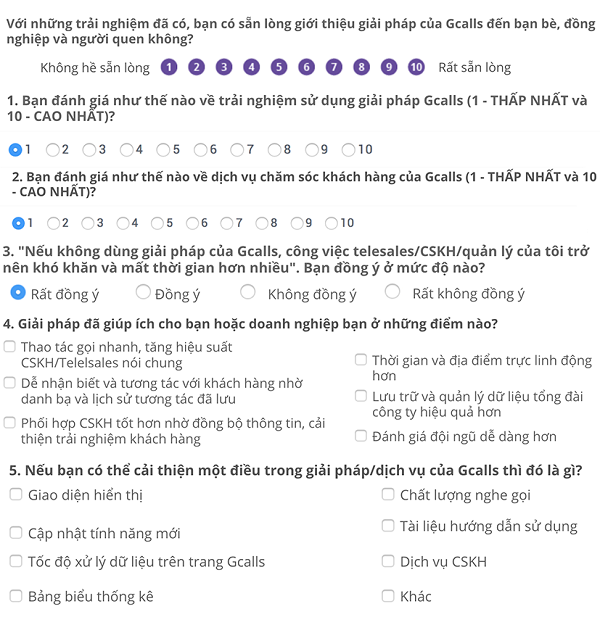
Then, finish with a thank-you note!
>> See more: 5 Steps to Build a Target Customer Survey Script
11+ Customer Survey Form Builders
HubSpot Customer Survey Form Software
HubSpot is a customer relationship management (CRM) platform. One of its features is building customer survey forms. With this tool, once you've created the form and surveyed customers, the data is automatically sent back to your CRM system. With this software, you can easily create your own customer survey forms with convenient drag-and-drop features, or take advantage of the question templates HubSpot provides. Once the survey form has been successfully set up, you can receive notifications about customer feedback or new leads by email.

SurveyMonkey Software
With SurveyMonkey, creating a simple survey is easy, and you can share it instantly via a link or embed code. It's a good fit for small and medium businesses whose customer base isn't too large, because the free plan limits surveys to 10 questions and 40 responses per form. However, you can create an unlimited number of surveys, so you can build multiple forms with similar questions to reach more customers.
SurveySparrow Software
SurveySparrow is a suitable choice for businesses. With the free plan, you get 10 questions per survey and 100 responses per month.

ProProfs Survey Maker Software
With just the free plan, this tool helps you create unlimited surveys. It also offers advanced features that let the business analyze results and easily access detailed information such as who filled out the response form, the date or month the form was completed, and so on. In particular, you can easily connect it to third-party applications like MailChimp, Zendesk, and more.
SoGoSurvey Customer Survey Form Software
This is a free tool businesses can use. The software places no limit on the number of surveys and — notably — no limit on the number of questions per survey. So you can choose your question count freely from more than 200 templates pre-written by the software. However, SoGoSurvey's free plan only allows 200 responses per year, so consider using it for in-depth survey campaigns or for shorter survey series aimed at specific customer segments.

Typeform Software
Typeform is probably familiar to many — it's quite popular and widely used in Vietnam. It's a tool that lets you design your own surveys and freely add images and videos. With Typeform, you don't need to go through too many complicated steps or spend a lot of time and effort to get a beautiful survey template.
Another unique feature of this tool is that you can embed the responses you receive into the survey. For example, if a customer enters their name when answering a question, their name will be mentioned in subsequent questions. This personalizes the survey content, helping create a closer relationship between the business and the customer.
Survicate Software
This is a professional customer survey form builder with unlimited questions and 100 responses per month. In addition, you can choose from more than 125 ready-made templates to build survey forms more easily.
Qualtrics Software
This tool provides many customer survey form templates as well as more than 100 question types commonly used by businesses. You can refer to the sample questions to speed up form creation. On the backend, the platform offers predictive and customer data analytics features, helping the business uncover customer insights.

SurveyPlanet Software
SurveyPlanet's free plan places no limit on the number of surveys, questions, or responses created. So it's a perfect choice for large businesses that need to survey a large customer base. However, one drawback of this tool is that exporting data is quite difficult if you don't use the Pro version. So consider upgrading before starting a large-scale survey campaign.
Google Forms Software
This is another customer survey form builder with unlimited questions and responses. Notably, Google Forms has no paid plan — it's completely free, and users can use every feature the provider offers. On top of that, it's very easy to export data when using Google Forms, as well as to insert images, videos, and more.
Alchemer Software
Alchemer gives you 3 free surveys with an unlimited number of questions. However, you only receive 100 responses per survey, so in our view, this software is best used for small and medium surveys.
SurveyLegend Software
This is a tool that allows unlimited questions and responses. In particular, its paid plan is embraced and used by many large companies such as Samsung, Airbnb, and more.

Conclusion
Above, SimERP has helped you better understand customer survey forms and customer survey questions. We hope that after reading this article, you'll be able to create truly high-quality, valuable customer survey forms.
Related Articles
Bài viết liên quan

25 tháng 10, 2026 · 3 phut doc
2024年网页设计趋势预测如何? | Wotech Electronics
关于 2024 年网页设计趋势——步入 2024 年,年初正是我们为新事物预留时间的时刻。这也非常适合设计师群体唤醒我们内心的"艺术之魂"。闲话不多说,快来和 Markdao 一起浏览 2024 年的 UX/UI 设计趋势吧,说不定您就能为自己接下来的网页设计项目"迸发"出一个绝妙的点子呢!

25 tháng 10, 2026 · 1 phut doc
什么是网站(Website)?网站的详细定义及其带来的商业价值
什么是网站(https://www.markdao.com.vn/blog/website-la-gi)——这个问题或许已经无需定义,因为在如今这个信息时代,网站对每一家企业而言都是不可或缺的组成部分。正是网站帮助用户更近距离地接触企业所提供的产品和服务,从而提升经营效益。此外,要在当今竞争如此激烈的环境中求发展,网站是一个重要因素,它将带你走向品牌与销量上的双重成功。

25 tháng 10, 2026 · 1 phut doc
什么是SEO标准网站?一场"打赢"Google SEO标准的战役 | Wotech Electronics
99%的用户在购买前会先搜索信息,73%的用户只会访问排名前10的网站,并认定它们是值得信赖的品牌……在数字营销爆发的时代,这些数字有力地印证了SEO标准网站的重要性。然而,许多人对什么是SEO标准网站(https://www.markdao.com.vn/blog/huong-dan-toi-uu-seo-website-chuan-seo-on-page)仍然相当模糊,并未真正理解。达到SE…