
Remote Work: Pros, Cons, and Popular Work Models | Wotech Electronics
Vũ Khôi
Tác giả tại Wotech Electronics Blog
Remote Work: Pros, Cons, and Popular Work Models
Vũ Khôi
Author at Wotech Electronics Blog
The COVID-19 pandemic has forced many businesses to adapt to new circumstances and change the way they work. Instead of coming to the office, employees are allowed to work remotely. Businesses use supporting tools to help employees optimize their productivity and manage them better.
However, according to many forecasts, remote work is not just a temporary solution — it will be a trend that companies at home and abroad will have to get used to. So which work model is the right fit? And what tools should businesses use?
What is remote work?
Remote work means that workers use modern communication and connectivity technology to do their jobs from anywhere. Because the work is done over the internet, you can sit at home, in a café, or anywhere else and still complete your assigned tasks. Similarly, the business monitors and manages employees through remote-work software and systems.
The remote work trend in Vietnam
Working from home is becoming an inevitable trend around the world today. PwC (one of the world's leading audit and consulting firms) has assessed the remote work model in Vietnam in the context of the ongoing COVID-19 pandemic.
Its report published in 2021 shows that 82% of survey participants believe remote work will become a common trend in the future, even after COVID-19. PwC Vietnam has demonstrated that as many as 80% of businesses believe adopting remote work is an inevitable trend for the current and future labor market.
19% of participants want to work fully remotely, 22% agree to work remotely 1 day or less per week, and 33% expect a hybrid model combining office and home work. To master the hybrid remote work model, businesses set out 3 remote work principles, including:
-
Changing management behavior and style: Prioritizing work outcomes, empowering employees, adopting AGILE thinking, etc.
-
Performance-boosting management methods: Management by objectives, establishing policies and workflows, using multiple communication channels, etc.
-
Building solid relationships with employees: Developing effective work-from-home practices, caring for employees, organizing team-bonding activities, fostering unity, etc.
The pros and cons of remote work

Advantages of remote work
Remote work brings businesses many benefits, such as:
-
Reducing the time and cost of commuting between home and office.
-
Flexible working hours and workspace.
-
Increased focus on work.
-
Stress relief.
-
Work-life balance.
-
Savings on office rent.
-
More opportunities to work with employees in different regions.
Let's look at each benefit in detail with SimERP below.
Less time and money spent commuting
When you work from home, you can save the time you would spend commuting. You also cut costs for fuel or public transport and travel services. Working from home, you don't have to face exhaust fumes, traffic jams, or the noise of car horns. That in turn reduces the stress of the daily commute.
Flexible working hours and space
When working from home, you can choose the workspace, clothing, or working method that suits and comforts you best. Employees will find it easier to work effectively than under a working style imposed by the company itself.
Greater focus on work
Working from home helps you cut down on distractions from computer noise and colleagues, and even limits the time spent chatting with people around you.
Stress relief
Working from home makes it easier for employees to manage stress. You can take short breaks of a few minutes during the workday to move around and rest whenever needed to reduce fatigue.
Work-life balance
Remote work helps you save more time for life, letting you work while still making room for rest.
Savings on office rent
With remote work, employees spend less time at the office. As a result, rent costs are significantly reduced. In fact, with a well-designed flexible remote work plan, a company can cut its real estate costs by up to 30% compared with full office-based work.
More opportunities to work with employees in different regions
With remote work, a business can hire employees from many different regions and areas, even different countries. This gives the business a competitive advantage, opens up new markets, and raises productivity. Employees at local offices can also learn knowledge, skills, and experience from international colleagues.

Disadvantages of remote work
Beyond the many benefits remote work brings to businesses, we also need to acknowledge the drawbacks of this model. Notably, remote work requires employees to have high discipline and self-motivation, and communication and exchanges between colleagues become less effective, etc.
Let's take a closer look at some of the drawbacks businesses should weigh before adopting this model.
Requires high discipline and self-motivation
Because you work in a comfortable environment with far less oversight than at the office, many employees struggle to get started on and complete their work on their own. For example, it is very easy to spend too much time resting, stretch out your lunch break, or get sidetracked by household chores. As a result, your work stalls, projects get delayed, and it becomes hard to complete them effectively.
Less effective communication and exchange
Communicating and exchanging information over the internet is usually less effective than talking in person. Employees waste time waiting for messages, and may even have to schedule meetings, which takes quite a lot of time.
Employees must solve problems on their own
When working at the office, you have plenty of time and opportunity to meet and quickly discuss things with colleagues and superiors. When working from home, however, you mostly have to solve difficult problems at work and develop yourself on your own, since there isn't much time to exchange ideas with colleagues.
Reduced interaction with colleagues
The primary means of communication when working from home is the internet. This limits the level of interaction with staff and colleagues.
Businesses struggle to manage employees
Instead of direct supervision, the business can only manage employees through email, reports, and online meetings. It is very hard to control workers, since this also depends on their honesty. Therefore, companies need to build a proper process and adopt remote work tools for more effective human resource management.
Popular remote work models today
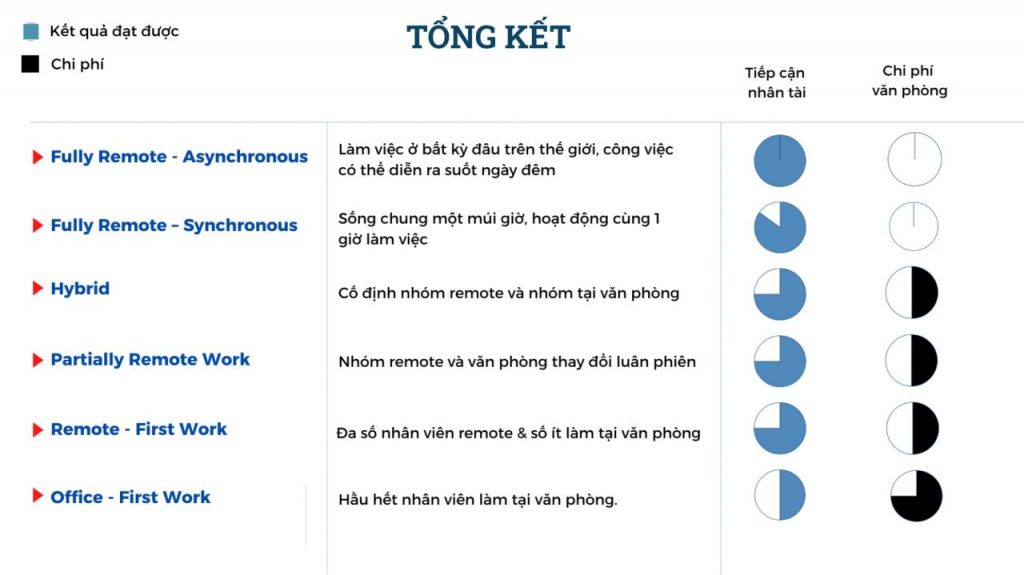
There are currently two common remote work approaches worldwide: fully remote and partially remote. Is there any difference between these two approaches? And how many models are widely used today?
Fully remote
With this model, the business doesn't have to spend money on rent, utilities, or internet. All employees are allowed to work at any time and any place they want, as long as they complete the required work and meet the set targets. There are currently two fully remote work models, including:
Model 1: Fully Remote – Asynchronous

This model suits companies with many employees living in different countries and regions. Workers can work anywhere, at any time they want. Tasks are assigned continuously with predefined deadlines. For example, freelance writers for a business can work remotely. They need to deliver a set number of articles per month, and their pay is based on that number of articles.
Advantages:
-
This model creates absolute flexibility for employees, since they can proactively choose the time and place that suit them.
-
With staff distributed across different regions, this model allows the business to provide products and services 24/7. Moreover, employers can set salaries appropriate to each employee's geographic region, thereby reducing hiring costs.
Disadvantages:
-
Because employees come from different regions with non-uniform working hours, there can be a lack of cohesion among staff.
-
Managers find it difficult to resolve issues raised by subordinates due to various factors such as geographic distance or differing working hours.
Model 2: Fully Remote – Synchronous
In contrast to the model above, staff must work in a specific time zone and usually within the same geographic area. Each employee handles part of a repetitive workflow and must coordinate with other employees at the same time to get the whole job done.
Advantages:
-
Better internal communication, coordination, and problem-solving between different departments and employees.
-
Real-time interaction among staff.
Disadvantages:
-
Customer support is only available during working hours.
-
Hard to hire overseas staff due to time zone differences.
Partially remote
Model 3: Hybrid work model
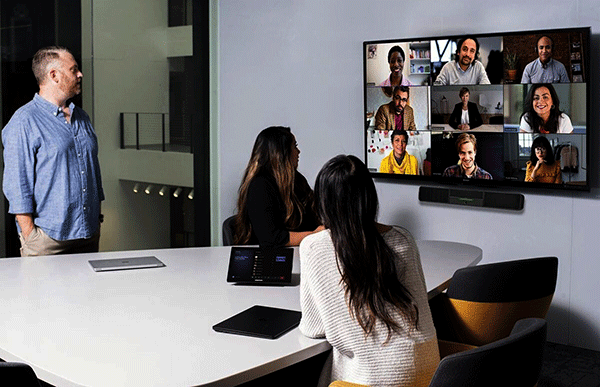
The business organizes a fixed group of employees to work at the office while others work remotely. Employees work from home a few days a week and spend the rest at the company.
Advantages:
-
Can recruit for positions outside the company's local area.
-
Reduced operating and office rental costs, since a portion of employees work from home. However, the business still has to budget for equipment and support tools for employees.
Disadvantages:
-
Hard to build cohesion between remote employees and office-based employees.
-
Difficulty balancing work and personal life.
-
Requires employees to be flexible in their work.
Model 4: Partially Remote
Employees are assigned to work remotely on specific days of the week according to the arrangement of managers at each level.
Advantages:
-
Partially remote work helps employees arrange their time and feel more at ease when commuting. It also makes it easier for them to adapt to a fully remote model.
-
Reduced costs related to equipment and office maintenance.
Disadvantages:
- Requires proper budgeting for the costs incurred when the office goes unused.
Model 5: Remote-First Work model

Employees mostly work from home, and only a few must work regularly at the office because of the nature of their jobs. For example, in the raw materials manufacturing industry, employees who use and operate the company's specialized machinery must come to the office to work. Meanwhile, staff such as marketing and sales can work from home.
Advantages:
-
Employees are more agile when working from home.
-
The business saves on rent. Instead of using a large office, the company can use a smaller one.
Disadvantages:
-
Fails to build cohesion between employees working from home and those at the office.
-
No fairness between office-based and home-based employees.
-
The business finds it hard to allocate costs fairly in proportion to the number of employees working at the office.
Model 6: Office-First Work
The opposite of the model above, this model applies when nearly all employees work at the office. Typically, employees are allotted a specific amount of time to work remotely — perhaps one day, or 16 to 24 hours per month. This helps employees manage their time sensibly while also reducing their need to take leave to handle personal matters.
Advantages:
-
Employees can balance life and work flexibly when they are free to arrange their work-from-home time sensibly.
-
The business saves a small part of its office maintenance costs.
-
Cohesion and coordination between different employees and departments are still assured.
Disadvantages:
-
The number of employees coming to the office varies, making it hard to control the count of working days.
-
Office rent becomes very costly if the premises must accommodate all employees when everyone comes in or works remotely on the same day.
Remote work software
To raise productivity and manage employees effectively, businesses need to use remote work tools at home. Below are 5 popular remote work software solutions that every business should use:
SimERP
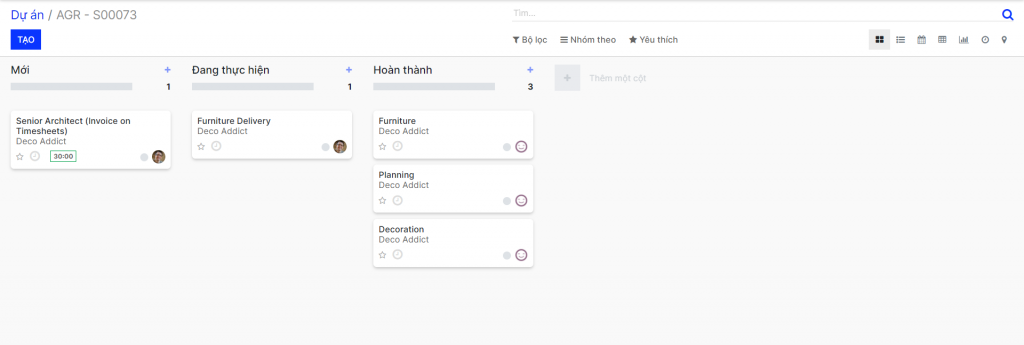
SimERP is the recommended software for every business thanks to its optimization and ease of use. With SimERP, managers can closely monitor all activities in the business — from Sales, Marketing, and HR to accounting and project management. Companies gain tighter control over every stage of a project. What's more, being an open-source platform, it can be fully integrated with third-party applications, its existing features customized, and new users added.
With a friendly, easy-to-use online interface, users manage things more effectively and quickly. For HR management in particular, SimERP supports the following functions:
-
Employee information management.
-
Attendance and working time management.
-
Planning, executing, and controlling recruitment activities.
-
Leave and payroll management.
In addition, with the project module, businesses can easily check employee activities and project status, specifically:
-
Creating projects and tasks.
-
Project management: editing and updating project information and status, adding watchers and project members.
-
Notifications about changes in projects and tasks.
-
Chatting and creating group chats with employees and colleagues.
-
Setting up sub-projects within larger projects.
SimERP currently offers a free SimCRM package for businesses for 30 days, with all of the features above. Sign up to try it!
Trello
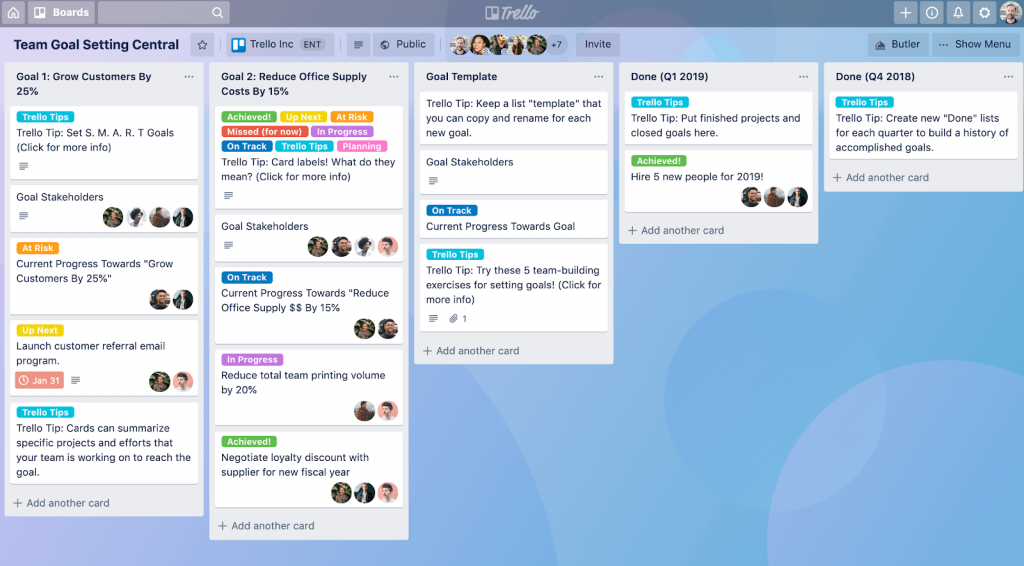
Trello is a visual work management tool that helps assign tasks and track and manage projects in a scientific, effective way. Trello members can see all of the work they need to do on the software interface. A Trello board consists of the following elements:
-
Board: where work items are displayed and organized, from the general to the detailed, within a project.
-
List: stores the cards containing information about project stages or work groups.
-
Card: stores detailed information about each work item that employees must complete during the project's stages.
-
Menu: the task control center for the Trello board. Administrators can track the activities of all members through the notifications on the menu. In addition, you can enable control features, search cards, and create automation workflows.
Trello is easy to use and suits small and medium-sized businesses, with its basic features free of charge. It also has a mobile version, so users can use it anywhere.
However, if you want a few extra features — such as unlimited boards, advanced Checklists, and custom fields — you will have to pay $5 per month. And with even more features, the monthly price can go up to $10 and $17.5.
Slack
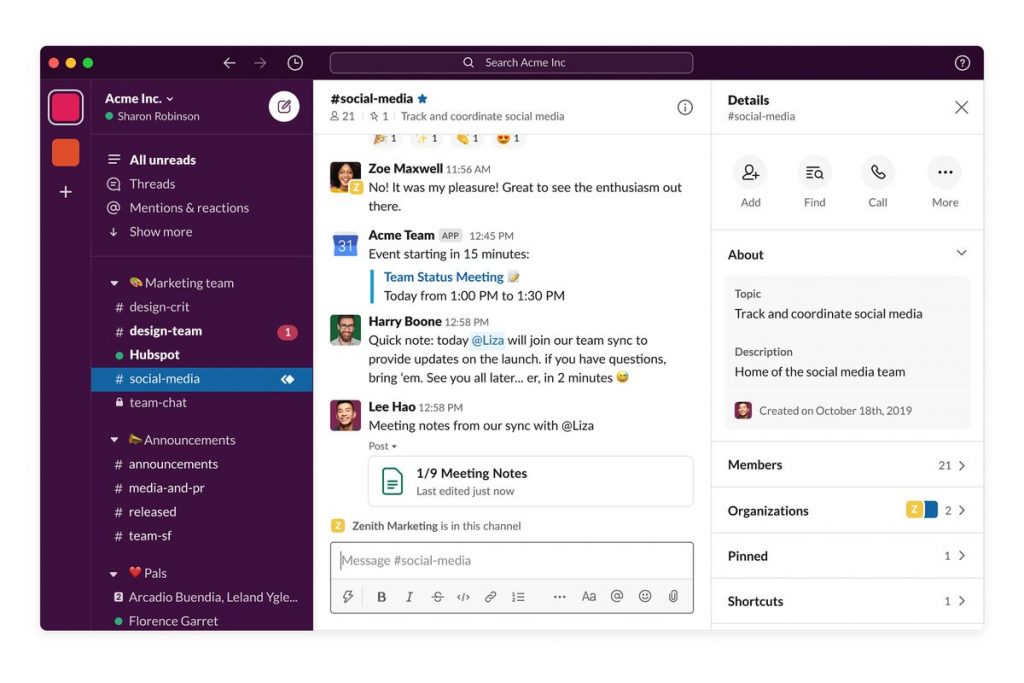
This is a free application used to help employees exchange ideas, interact, and communicate with one another. Like other messaging tools, team members can message each other back and forth. Its main features include:
-
Organizing conversations across many different channels and groups.
-
Voice calling, allowing users to interact with each other within the group.
-
Setting reminders for important tasks, such as a timed reminder about a meeting at a specific time.
-
Pinning messages to a group chat.
-
Seeing the job title and organization of people in the group.
-
Integration with other applications such as Github, Google Drive, Dropbox, etc.
However, Slack only allows 10,000 messages of storage on the free plan. So the business runs the risk of losing important information if it exceeds 10,000 messages. Today, besides the free plan, Slack also offers $6.67 or $12.5 per month per user plans, guaranteeing more features.
Dropbox
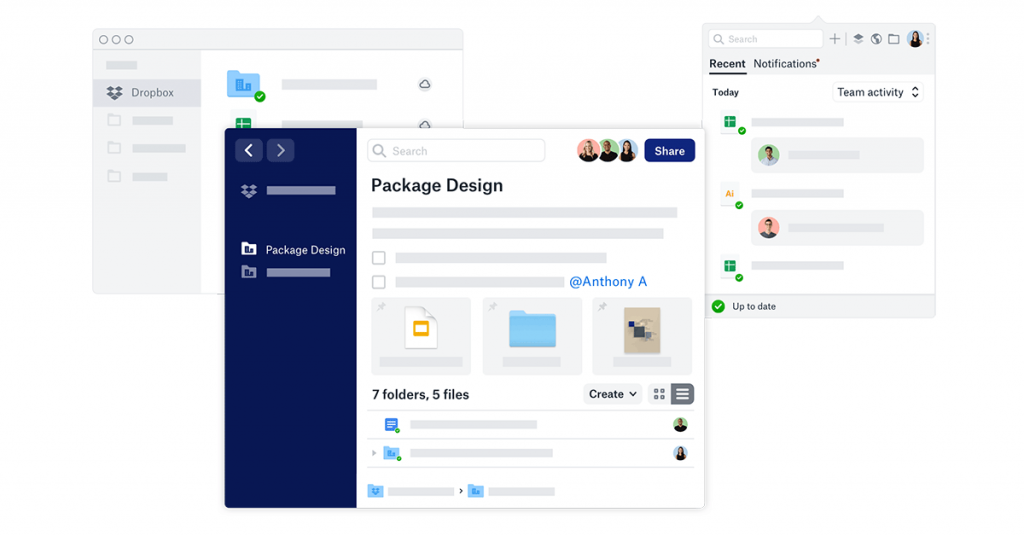
Dropbox is an online storage and file-sharing system. Any data put into Dropbox is synced on Dropbox's servers and shared with you and those granted access. The software has the following features:
-
Favoriting labels for offline document viewing.
-
Uploading files to Dropbox via URL.
-
Website data backup.
-
Automatic file recovery and backup.
-
Integration with other systems such as Microsoft and Slack. It also syncs with more comprehensive cloud storage systems, such as digital asset management.
The basic Dropbox plan is completely free, but it only offers 2GB of storage. To upgrade storage, users must move to a paid plan: Dropbox Plus at $9.99/month and Dropbox Professional at $19.99/month. These prices are for individual users only.
Dropbox also has a business version in two tiers, "Standard" and "Advanced," with many features such as data recovery, encryption, and a few other functions. The Standard plan costs $12.5 per month with a 2TB storage limit. The Advanced plan has no storage limit, but you must pay one year upfront at $20 per month, or $25 per month if billed individually.
Hub Staff
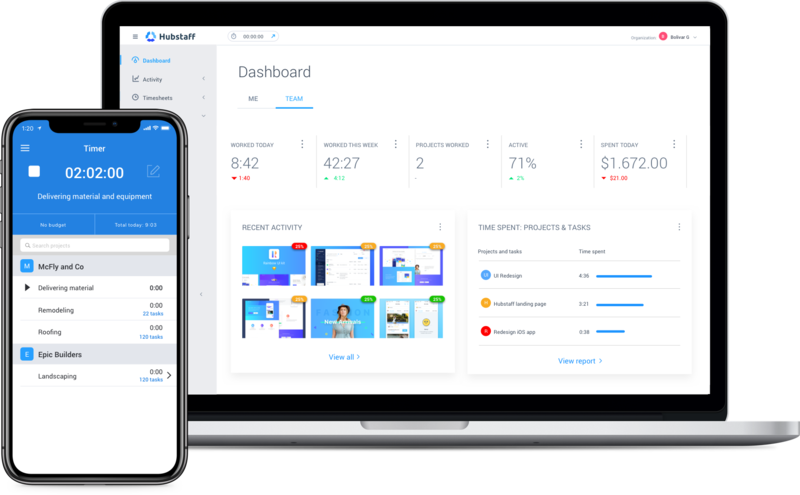
When it comes to remote work software, Hub Staff is certainly one of the first names many people think of. Business managers can use this app to track projects and work items at any time. Notable features include:
-
Online timesheets.
-
Creating work schedules, meetings, and appointments.
-
Employee monitoring and GPS tracking.
-
Working time management.
-
Automatic payroll calculation.
-
Measuring and evaluating employee competence.
-
Creating invoices and building, managing budgets.
The software currently offers a 14-day free trial. On the free version, you get to experience a few features but with limited reporting and limited billing. The paid versions include Starter at $7/month and Pro at $10/month. These prices are per user.
Conclusion
Remote work is not just a temporary solution for businesses during the COVID-19 pandemic — it promises to become a long-term working style for many companies. We hope the article above has provided you with useful information about remote work models, as well as the effective remote work software that managers should use.
Related articles
Bài viết liên quan

25 tháng 10, 2026 · 3 phut doc
2024年网页设计趋势预测如何? | Wotech Electronics
关于 2024 年网页设计趋势——步入 2024 年,年初正是我们为新事物预留时间的时刻。这也非常适合设计师群体唤醒我们内心的"艺术之魂"。闲话不多说,快来和 Markdao 一起浏览 2024 年的 UX/UI 设计趋势吧,说不定您就能为自己接下来的网页设计项目"迸发"出一个绝妙的点子呢!

25 tháng 10, 2026 · 1 phut doc
什么是网站(Website)?网站的详细定义及其带来的商业价值
什么是网站(https://www.markdao.com.vn/blog/website-la-gi)——这个问题或许已经无需定义,因为在如今这个信息时代,网站对每一家企业而言都是不可或缺的组成部分。正是网站帮助用户更近距离地接触企业所提供的产品和服务,从而提升经营效益。此外,要在当今竞争如此激烈的环境中求发展,网站是一个重要因素,它将带你走向品牌与销量上的双重成功。

25 tháng 10, 2026 · 1 phut doc
什么是SEO标准网站?一场"打赢"Google SEO标准的战役 | Wotech Electronics
99%的用户在购买前会先搜索信息,73%的用户只会访问排名前10的网站,并认定它们是值得信赖的品牌……在数字营销爆发的时代,这些数字有力地印证了SEO标准网站的重要性。然而,许多人对什么是SEO标准网站(https://www.markdao.com.vn/blog/huong-dan-toi-uu-seo-website-chuan-seo-on-page)仍然相当模糊,并未真正理解。达到SE…