Ridiculously Easy 3D Website Design in a Snap with Spline 3D | Wotech Electronics
Vũ Khôi
Tác giả tại Wotech Electronics Blog
Ridiculously Easy 3D Website Design in a Snap with Spline 3D
Preliminary look at Spline, a tool for 3D websites
Spline is a 3D design and website design tool for creating and editing 3D objects right in the browser. Because it is a vector-based tool, objects are created and edited using mathematical curves. Spline is very flexible, allowing you to easily create complex shapes.
Spline was founded in 2020 by a team of former Google employees. The company's mission is to make 3D design in general — and 3D website design in particular — accessible to everyone. Even if you have no experience with 3D design, Spline is extremely simple by design, so beginners can jump straight into 3D.
1. What is Spline 3D? — Getting started with 3D websites
Spline is a 3D design tool for creating and editing 3D objects in the browser. Because it is vector-based, objects are created and edited using mathematical curves. Spline is very flexible, allowing you to easily create complex shapes.
2. Features of Spline 3D for 3D websites:
Some of Spline's features include:
-
Real-time collaboration: Spline 3D supports real-time collaboration, so you can work on projects with others at the same time. This is great for teams or anyone who wants feedback on their work.
-
AI tools: Spline includes several AI tools that help you create 3D objects faster and more easily. For example, you can use the AI Prompt tool to generate 3D objects by describing what you want to create.
-
Export options: Spline lets you export your designs in multiple formats, including JPG, PNG, MP4, GIF, GLTF, and USDZ. This makes it easy to share your designs with others or integrate them into your projects.
-
Easy to learn: Spline is designed to be easy to learn, even if you have no 3D design experience. The interface is intuitive and the tools are simple to use.
-
Affordable pricing: Spline 3D offers a free plan for individual users and subscription plans for teams. The subscriptions are reasonably priced, making Spline an excellent choice for businesses and creative professionals.
3. How does Spline 3D work?
Spline 3D is a vector-based 3D design tool. This means mathematical curves are used to create and edit objects. Spline is very flexible, letting you easily create complex shapes — which is why it is a wonderful 3D website design companion tool for beginners.
To create a 3D object in Spline, you first draw a spline curve. Spline curves are genuinely "smooth" for design and can be used to produce various shapes. Once you've drawn a spline curve, use the Extrude tool to turn it into a 3D object.
Spline also includes several other tools for creating and editing 3D objects. These include:
-
Move tool: lets you move 3D objects around the scene.
-
Rotate tool: lets you rotate 3D objects around the scene.
-
Scale tool: lets you scale 3D objects up or down.
-
Simplify tool: lets you reduce the number of vertices in a 3D object, making it easier to work with.
-
Smoothing tool: lets you smooth the edges of a 3D object.
4. Who is Spline 3D for?
Spline is a great solution for everyone — regardless of skill level — for anyone who wants to build 3D objects. It is an excellent choice for beginners, hobbyists, and professionals in the field, including 3D website designers.
Spline is also a good choice for teams. Its real-time collaboration feature makes working together on projects simple.
Spline is a superb 3D design tool that is both powerful and easy to use.
Spline 3D guide for 3D websites
Getting started with Spline for 3D websites
To start using Spline, create an account on the Spline website. Once your account is created, you can sign in and begin building your first 3D object.
Spline's interface is very easy to use. The main toolbar contains all the tools needed to create and edit 3D objects. You can also change your objects' properties — such as size, color, and material — using the Properties panel.
The Spline tool can be used to create a basic 3D object. You can use the Spline tool to draw a spline curve — a smooth, flowing curve. The spline curve can then be converted into a 3D object with the Extrude tool.
Using Spline's AI tools to support 3D website design
Spline includes several AI tools to help you create 3D objects faster and more easily. For example, you can use the AI Prompt tool to generate 3D objects by describing what you want to create.
To use the AI Prompt tool, simply type a description of the object you want into the text field. Based on your description, Spline will generate a 3D object.
Exporting your designs
Once your 3D model is built, you can export it in many different formats. JPG, PNG, MP4, GIF, GLTF, and USDZ are all supported.
To export your design, click the Export button on the toolbar, then choose the format you want to export to.
Tips for using Spline 3D
Tips for using the AI tools
Use the AI Prompt tool to generate 3D objects by describing what you want. It's a great way to get started if you don't have a specific design in mind.
Use the AI Denoiser tool to remove noise from your 3D objects. This can make your objects look cleaner and smoother.
Use the AI Upscaler tool to increase the resolution of your 3D objects. This can make your objects look more detailed.
Tips for optimizing your workflow with Spline 3D
Use the layers panel to organize your 3D objects. This helps you keep track of your work and makes editing objects easier.
Use the undo/redo buttons to experiment with different changes without losing your work. This helps you find the best way to build your 3D objects.
Use keyboard shortcuts to speed up your workflow. There are several shortcuts that give you quick access to different tools and features.
Troubleshooting common 3D website design issues with Spline 3D
If you run into a problem with a specific tool, check the Spline documentation. It contains detailed instructions for using all of the tools.
If you're still stuck, you can ask for help on the Spline community forum. It's a great place to get assistance from other Spline users.
Spline pricing plans
Spline offers 3 pricing tiers:
-
Individual: $19 per month
-
Team: $49 per month per user
-
Enterprise: Custom pricing on request
The Individual plan is for solo users. The Team plan is for teams of up to 10 users. The Enterprise plan is for teams larger than 10 people or bigger organizations.
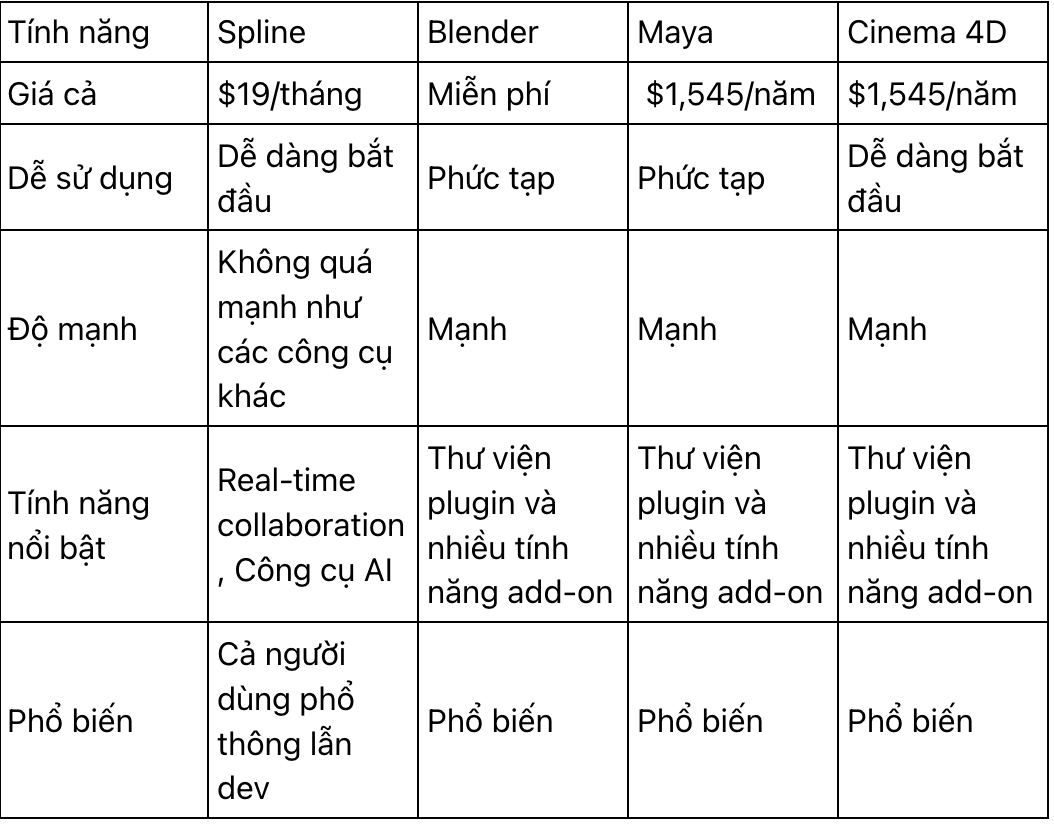
Comparing Spline 3D with other 3D design tools — Which 3D website design tool should you choose?
Discussing the future of Spline in the 3D website space
Spline is a powerful, flexible 3D design tool with enormous potential. The company has several exciting features planned for the future, including:
-
Real-time collaboration: This feature will allow multiple users to work on the same 3D object at once. It will be a great way to collaborate on projects with teams or other creative professionals.
-
New AI tools: Spline is developing new AI tools that make creating 3D objects even easier. These include an AI text-to-mesh tool that can generate 3D objects from text descriptions and an AI animation tool that can automatically animate 3D objects. These tools will let you create 3D objects without manual modeling, saving time and effort.
-
Performance improvements: Spline is continually working to improve the tool's performance. This will make it faster and more responsive while reducing its memory footprint — making Spline easier to use on less powerful devices.
These are just a few of the exciting things in Spline 3D's future. I believe this tool will keep growing and expanding in the years ahead, and I'm eager to see what it can achieve.
In my view, Spline has the potential to become a truly groundbreaking 3D design tool. It could be used to build 3D assets that are more realistic and detailed than ever, as well as more interactive and engaging 3D objects. I believe Spline will continue to grow and expand in the coming years, and I'm very excited to see what it can do for the design industry in particular.
Pros and cons of Spline
Here are some of Spline 3D's strengths and weaknesses to weigh when using it for 3D website projects:
Pros:
-
Easy to use
-
Real-time collaboration
-
AI tools
-
Many export options
Cons:
-
Can be expensive for some users
-
Not as powerful as some other 3D design tools
Conclusion
In short, Spline 3D is a powerful, flexible 3D design tool with a great deal of potential. It has several exciting features planned for the future, including real-time collaboration, new AI tools, and performance improvements. It offers excellent support for 3D website projects. I believe Spline has the potential to become a truly revolutionary 3D design tool, and I look forward to seeing what it achieves in the years to come.
If you're interested in learning more about Spline, I encourage you to visit the Spline website or sign up for a free trial. With Spline, you can create stunning 3D objects that will amaze your friends and colleagues.
Related articles
Bài viết liên quan

25 tháng 10, 2026 · 3 phut doc
2024年网页设计趋势预测如何? | Wotech Electronics
关于 2024 年网页设计趋势——步入 2024 年,年初正是我们为新事物预留时间的时刻。这也非常适合设计师群体唤醒我们内心的"艺术之魂"。闲话不多说,快来和 Markdao 一起浏览 2024 年的 UX/UI 设计趋势吧,说不定您就能为自己接下来的网页设计项目"迸发"出一个绝妙的点子呢!

25 tháng 10, 2026 · 1 phut doc
什么是网站(Website)?网站的详细定义及其带来的商业价值
什么是网站(https://www.markdao.com.vn/blog/website-la-gi)——这个问题或许已经无需定义,因为在如今这个信息时代,网站对每一家企业而言都是不可或缺的组成部分。正是网站帮助用户更近距离地接触企业所提供的产品和服务,从而提升经营效益。此外,要在当今竞争如此激烈的环境中求发展,网站是一个重要因素,它将带你走向品牌与销量上的双重成功。

25 tháng 10, 2026 · 1 phut doc
什么是SEO标准网站?一场"打赢"Google SEO标准的战役 | Wotech Electronics
99%的用户在购买前会先搜索信息,73%的用户只会访问排名前10的网站,并认定它们是值得信赖的品牌……在数字营销爆发的时代,这些数字有力地印证了SEO标准网站的重要性。然而,许多人对什么是SEO标准网站(https://www.markdao.com.vn/blog/huong-dan-toi-uu-seo-website-chuan-seo-on-page)仍然相当模糊,并未真正理解。达到SE…