Managing Inventory with Excel: Simple, but Is It Still the Right Fit? | Wotech Electronics
Vũ Khôi
Tác giả tại Wotech Electronics Blog
Managing Inventory with Excel: Simple, but Is It Still the Right Fit?
Vũ Khôi
Author at Wotech Electronics Blog
Warehouse management is considered the backbone that directly affects every business activity. Small and medium-sized businesses with a modest volume of goods often manage their inventory with Excel to keep costs down. However, using Excel for inventory management demands quick, accurate work. In the article below, SimERP will show you how to manage inventory with Excel and share useful tips for building and using a simple inventory management spreadsheet.
The Inventory Management Excel File
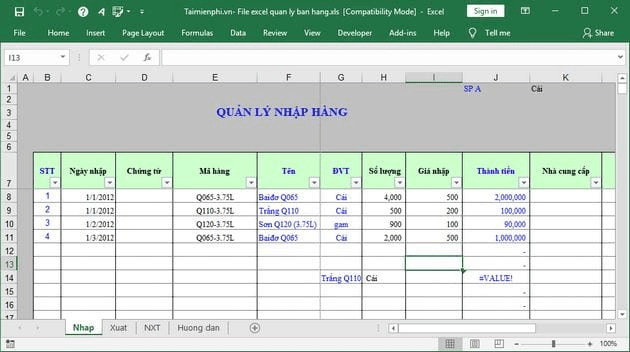
Each type of goods has different characteristics: some are managed by serial number/IMEI, some by batch/date, and some by composition. Make sure you have an Excel inventory file suited to the products you sell — avoid the mistake of a tech retailer downloading a file template built for fashion or food products.
You can download a general-purpose Excel inventory template and add or remove rows and columns to fit your products. For example, for cosmetics with expiration dates, you can add a batch/date column so you know when each batch expires. For serial/IMEI-tracked goods, add a serial/IMEI column so you can track stock precisely by IMEI code.
This Excel inventory file needs the following fields:
-
Goods issued (outbound)
-
Goods received (inbound)
-
Stock on hand
Keep in mind, however, that Excel is a simple inventory management solution, so it is not suitable for managing large volumes of goods with hundreds of columns of information. Managing that much inventory in Excel can consume a great deal of calculation time and make tracking and updating very difficult.
Inventory management with Excel is one of the ways small store owners can manage their goods more easily and conveniently. It is a method many store owners use to keep control of stock levels.
Key Excel Functions for Inventory Management
One thing that is extremely important for using an inventory spreadsheet easily is a solid grasp of Excel fundamentals. KiotViet shares some basic functions so you can process your data as quickly as possible.
Lookup Functions
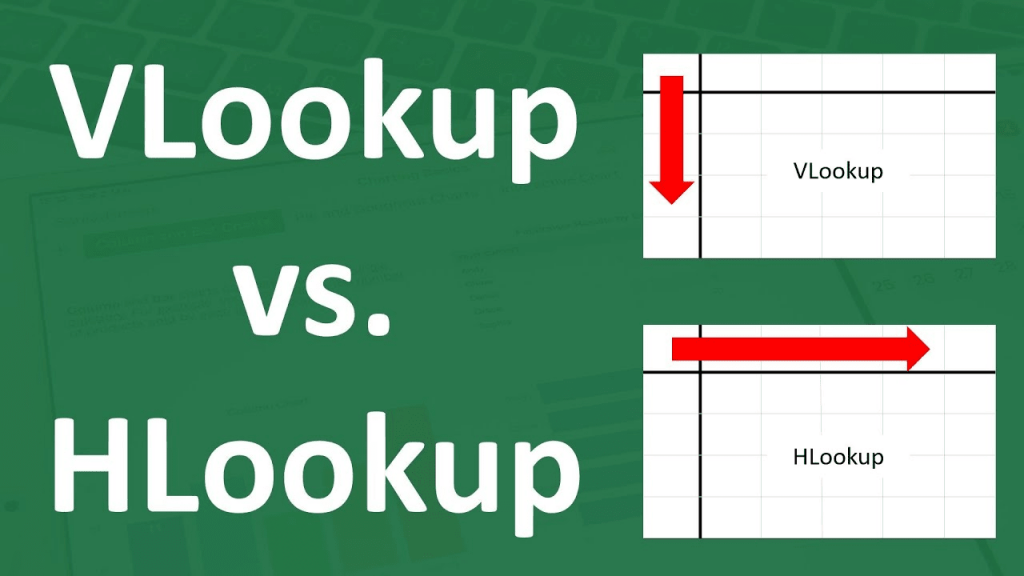
Lookup functions are used constantly by warehouse accountants. They retrieve order names, brand codes, customer and buyer details, and so on. The lookup functions are VLOOKUP and HLOOKUP.
VLOOKUP searches and references column-oriented data.
Formula: VLOOKUP(lookup_value, table_array, col_index_num,[range_lookup])
HLOOKUP searches for values in a horizontal row.
Formula: HLOOKUP(lookup_value, table_array, row_index_num,[range_lookup])
The IF Conditional Function
The IF function is also commonly used in warehouse accounting. IF returns value 1 if the condition is true and value 2 if it is false. It is often used to build goods in/out tracking tables.
Formula: IF(logical_test,[value_if_true],[value_if_false])
The Conditional Sum Function SUMIF
SUMIF calculates sums — for a warehouse accountant, this is the most heavily used function. It returns the total value of the cells to be calculated, but the sum must satisfy the specified criteria ranges.
Formula: SUMIF(range,criteria,[sum_range])
The LEFT Function
In Excel, the LEFT function extracts characters from the left side of a text string.
Formula: LEFT(cell containing the string, number of characters to extract)
The LEN Function
LEN counts the total number of characters.
Formula: LEN(cell containing the string to count)
LEN can also count total digits, letters, and spaces.
The SUBTOTAL Function
SUBTOTAL calculates a subtotal within a list or data table. Depending on the operation, the user can select it in the argument.
Formula: SUBTOTAL(argument to calculate)
Inventory Management with Google Sheets
Warehouse management with Google Sheets or Google Drive offers one big benefit: it allows multiple people to enter data simultaneously. Here's how to manage inventory with Google Sheets:
Step 1: Create the inventory file directly in Google Sheets or upload an existing template
– Create an inventory file directly in Google Sheets:
-
Simply go to https://docs.google.com/spreadsheets/u/1/ and click the "Start a new spreadsheet" button
-
After clicking, Google Sheets will automatically create a new spreadsheet in your browser
– Upload an existing template file to Google Sheets:
-
Go to the link: https://drive.google.com/drive/u/1/my-drive
-
Then click the "New" button
-
Next, press "File upload"; when the file selection window appears, just pick your file and upload it — done
Step 2: Share with multiple people and edit access permissions
-
Step 1: Go to https://drive.google.com/drive/u/1/my-drive
-
Step 2: Right-click the file you want to share
-
Step 3: Click the "Share" button
-
Step 4: In the window that appears, enter the email address of the person you're granting access to, and choose view-only, edit, or comment permission
-
Step 5: Click "Done" to finish setting user permissions in Google Sheets
Step 3: Set up your catalogs, enter data, and view reports
Once you have the inventory file and have finished granting access permissions, you can begin entering data and managing inventory using the calculation functions covered above.
Tips for Managing Inventory with Excel or Google Sheets

Excel is an alternative to dedicated inventory software, suited to businesses with a modest volume of goods. With its simple toolset and features, Excel lets companies manage inventory at a reasonable cost and with very simple operations. Here are tips for managing inventory with Excel simply and effectively.
Avoid Excel Stocktake Errors
One of the reasons large companies don't use Excel for inventory management is that the tool is error-prone. In practice, it is very difficult to pinpoint the cause of errors in spreadsheets and hard data — unless you know exactly where these errors originate and can hunt them down. The only way to avoid spreadsheet errors is to self-review and check daily to minimize mistakes.
Update Immediately
To avoid unfortunate mishaps, managers must ensure that every employee handling orders updates the Excel data immediately. Excel is not a real-time inventory management solution, so actual stock figures often don't match the spreadsheet. Managers need to regularly update data on actual stock to make sure there is enough goods to supply the market.
Consolidate Data Regularly

Each month, businesses should spend time consolidating and updating their data to build charts sketching the quantity of goods sold in each period. This should be done monthly and quarterly, especially during peak periods such as holidays or promotions. One of Excel's biggest limitations is its inability to produce time-based reporting and analysis. However, if users take the time to consolidate data into a summary sheet, the problem is easily solved. It takes time, but the results are quite rewarding, allowing the business to track and monitor sales by period.
Evaluate the Data
Free inventory management with Excel lets a business keep track of warehouse space. However, to get the most out of this tool, managers must monitor stock and calculate sensibly. Carefully reviewing the figures you use in your calculations ensures accurate information, limits errors, and saves time.
Stocktaking and Overall Review
Managing inventory with Excel requires manpower for data entry, or the business needs to connect a barcode scanner to the spreadsheet system. Not everything done in Excel can be automated, in other words. That's why using Excel often leads to risks from data-entry mistakes, from users rearranging things too many times, or from profit margins being assessed too high or too low. This can disrupt — or even derail — the company's inventory management process. Managers therefore need to keep an eye on everything and re-verify the figures every day.
Pros and Cons of Managing Inventory with Excel/Google Sheets

Managing inventory with an Excel file has the following pros and cons:
Advantages
-
Very simple to operate and easy to use
-
Highly accessible — free to download and use, saving on usage costs
-
You can add or remove data at will
-
Well suited to small and medium-sized businesses with simple sales management processes
Disadvantages
-
Data is not secured, putting important company information at risk
-
Only suitable for small volumes. As transactions grow, data processing slows down
-
No detailed statistics or reports
-
Simple Excel inventory management allows only one person working on one spreadsheet, costing the business extra manpower and time
-
Cannot generate invoices, limiting integration with sales devices
-
Manual data entry — time-consuming and error-prone
-
Managing receivables with customers and suppliers is easily confused
-
Figures are not regularly synchronized with other departments
For large businesses with large volumes of data, complex sales operations, and numerous products and customers, Excel struggles to keep up. Managers find it hard to track fragmented information, which makes it impossible to link data into detailed reports.
Why You Should Switch to Professional Inventory Management Software
Using inventory management software helps a business save manpower, time, and costs — and delivers many other benefits as well.
Save on Manpower

Personnel costs are very high when there is a large volume of items to manage, because the business needs many warehouse staff. With professional inventory management software, companies can certainly cut headcount to a minimum, while making workforce management easier and more effective.
Manage Stock Quantities Accurately
When using warehouse management software, beyond optimizing storage operations and maximizing warehouse space, a business can manage stock quantities with extreme accuracy based on information such as model, batch number, specifications, expiration date, and more.
Always knowing exactly how many units and product types you hold ensures the company can fully meet customer demand. Moreover, with professional inventory software, managers get the most comprehensive view of stock across all warehouses, minimizing inventory and avoiding tying up fixed capital.
Manage Details and Quotas for Every Item
Today's warehouse management software supports managing items in multiple units of measure (m, cm, tons, quintals, decitons, kg, boxes, sacks, bottles, jars, etc.), so managing stock quotas accurately has never been simpler or faster.

For example, in the supplies warehouse of a company that manufactures and distributes medicines and medical equipment: there are 100 boxes of Panadol and 150 boxes of Bionic. All of these figures can be managed easily in the inventory software.
In addition, when linked with accounting software, the inventory system can also help calculate raw materials and supplies before production, calculate product costs, and set material quotas for a specific product.
Instant Detailed Reporting
Today's inventory software can generate reports with content and formatting tailored to user needs, based on continuously updated data. Reports can be presented as diagrams, tables, and charts to display the figures and data, giving viewers the most vivid, intuitive picture possible.
In addition, warehouse accountants can easily export reports to Excel files.
Information Security Through Powerful Role-Based Permissions
Inventory management software can assign permissions to employees according to their position and authority within the company. That means not everyone is granted access to all modules; some may be limited in how they can operate on data, and for certain data, employees can view but not edit or delete.
Introducing SimERP Software and Its Inventory Module
About SimERP

SimERP is an enterprise resource planning solution built on Odoo — the world's leading ERP software with many outstanding advantages. SimERP has been developed with more than 30 core modules and 1,000 flexibly customizable applications, serving a network of up to 4.5 million users worldwide.
SimERP's Advantages
– A comprehensive solution
SimERP provides the full suite of management solutions for a business. All of these applications and modules are integrated and synchronized in a single system.
– Low deployment cost
Built on an open-source platform, SimERP allows businesses to deploy at a relatively low initial cost — in many cases far lower than other ERP solutions.
– An easily extensible platform
Businesses can easily integrate third-party applications (such as shipping services, payment gateways, etc.), customize existing applications, or add new users.
– A user-friendly interface
With a drag-and-drop interface compatible with websites and mobile devices, SimERP helps users manage their work more effectively and quickly.
SimERP's Inventory Module
Today, using enterprise resource planning (ERP) software — typically SimERP Inventory — to manage warehouse accounting activities has become commonplace for businesses in the Industry 4.0 era.
Built on the leading Odoo ERP platform, SimERP's Inventory module is trusted and used by many businesses thanks to the following standout features:
-
Double-entry inventory management, allowing users to trace products fully from supplier to customer. All data is consolidated and updated according to the user's configuration.
-
Supports packing and shipping orders with or without barcodes (QR codes, barcodes), and prepares purchase orders based on product availability.
-
Manages all warehouses in one system using replenishment rules between warehouses.
-
Barcode scanner support for every stocktaking activity, from inventory to batches to packed orders, and more.
-
Controls processing time with automation technology for inventory transactions, improving transparency in production and business operations.
-
Supports items with different characteristics: physical products, consumer goods, digital products, and services. Users can add any customizations needed to meet business requirements.
-
Uses reorder points and automatic RFQs to support more efficient supply chain operations.
-
SimERP's inventory management system supports FIFO (first in, first out), average cost, and standard cost as product costing methods.
Conclusion
It's fair to say that Excel is the optimal inventory solution for small shops and businesses. However, as operations scale up, businesses will need dedicated inventory management software to automate data entry and processing. We hope this article has given you useful information. If you have any questions, leave a comment below this article so SimERP can support you promptly!
Related Articles
Bài viết liên quan

25 tháng 10, 2026 · 3 phut doc
2024年网页设计趋势预测如何? | Wotech Electronics
关于 2024 年网页设计趋势——步入 2024 年,年初正是我们为新事物预留时间的时刻。这也非常适合设计师群体唤醒我们内心的"艺术之魂"。闲话不多说,快来和 Markdao 一起浏览 2024 年的 UX/UI 设计趋势吧,说不定您就能为自己接下来的网页设计项目"迸发"出一个绝妙的点子呢!

25 tháng 10, 2026 · 1 phut doc
什么是网站(Website)?网站的详细定义及其带来的商业价值
什么是网站(https://www.markdao.com.vn/blog/website-la-gi)——这个问题或许已经无需定义,因为在如今这个信息时代,网站对每一家企业而言都是不可或缺的组成部分。正是网站帮助用户更近距离地接触企业所提供的产品和服务,从而提升经营效益。此外,要在当今竞争如此激烈的环境中求发展,网站是一个重要因素,它将带你走向品牌与销量上的双重成功。

25 tháng 10, 2026 · 1 phut doc
什么是SEO标准网站?一场"打赢"Google SEO标准的战役 | Wotech Electronics
99%的用户在购买前会先搜索信息,73%的用户只会访问排名前10的网站,并认定它们是值得信赖的品牌……在数字营销爆发的时代,这些数字有力地印证了SEO标准网站的重要性。然而,许多人对什么是SEO标准网站(https://www.markdao.com.vn/blog/huong-dan-toi-uu-seo-website-chuan-seo-on-page)仍然相当模糊,并未真正理解。达到SE…