No Need to Pay for ChatGPT: Jan Turns an Old 8GB RAM Laptop Into Your Own Free, Offline AI
Vũ Khôi
Tác giả tại Wotech Electronics Blog
No Need to Pay for ChatGPT: Jan Turns an Old 8GB RAM Laptop Into Your Own Free, Offline AI
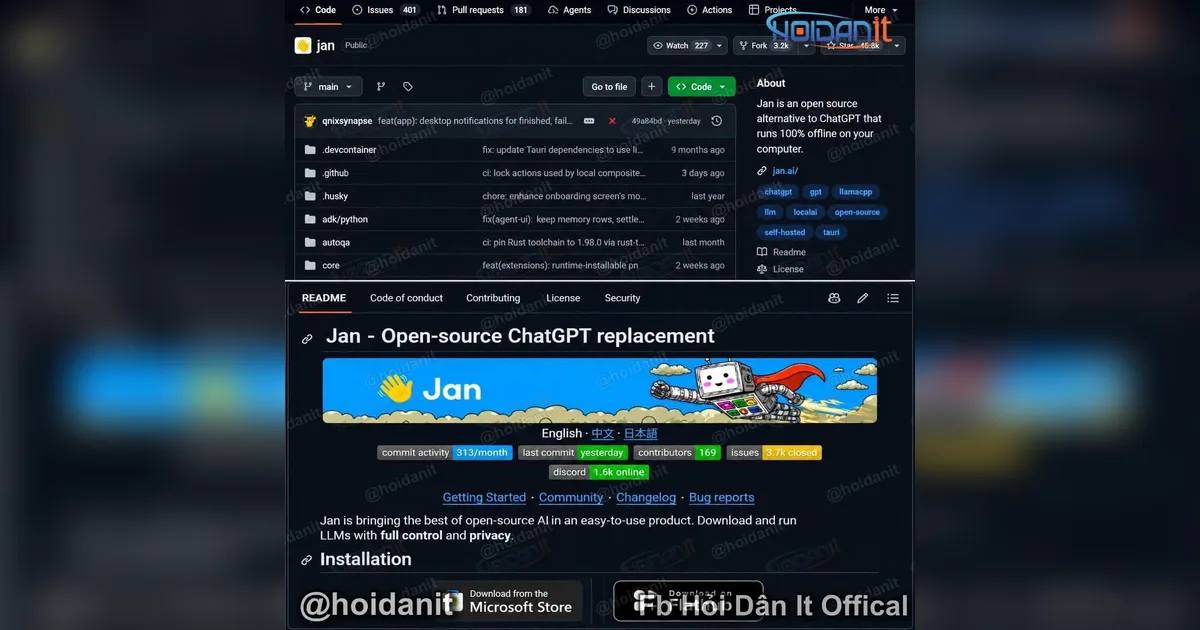
No need to pay for ChatGPT — an old laptop with 8GB of RAM can run its own AI, free and without the internet. That is the content of a post by the Hỏi Dân IT Official page (20/11/2026) about Jan — an open-source project attracting over 45,000 stars on GitHub, which turns a personal computer into an AI system running right on the device. All figures, features, and views in this article follow the post and have not been independently verified by Wotech.
Quick answer: According to the post, Jan is an open-source app for downloading and using large language models (LLMs) right on your computer, with a familiar chat interface but processing that can happen entirely on-device. The money point: no need to send data to external servers, no internet connection needed after downloading the model, and no subscription fee to use locally running models. Even more, with some small optimized models, a computer with only 8GB of RAM can experience offline AI. The shared source suggests combining Jan with Gemma 4 E4B, downloadable directly from inside the app if the model is supported. How to start: (1) download Jan from the official website; (2) install it on Windows, macOS, or Linux; (3) open the model library and pick a version matching your RAM; (4) download the model, wait for it to finish, then try disconnecting Wi-Fi to chat. The post's note: 8GB of RAM does not mean every model runs smoothly — response speed also depends on the CPU, GPU, model size, and system memory usage.
An LLM (large language model) is an AI model trained on large amounts of text to understand and generate natural language — per the post, Jan helps download and use these models right on your own computer.
What does Jan have to earn over 45,000 GitHub stars?
According to the post, simply put, Jan is an open-source app for downloading and using large language models (LLMs) right on your computer. The chat interface is familiar, but processing can happen entirely on your own device. Some notable points:
| Feature | What Jan does, per the post |
|---|---|
| Runs AI offline | Download a model once, then disconnect Wi-Fi and still chat with AI |
| No API fees when running local | No need to buy tokens to send each question to a server |
| More private data | Conversations with the local model need not be sent to an external AI service |
| Supports many models | Download and switch between compatible models right in the app |
| Open source | Developers can study, customize, and deploy it to their needs |
Can an 8GB RAM laptop run it?
According to the post, yes, if you choose the right model and configuration. For example, you can try small model versions that are quantized to reduce memory footprint. The shared source suggests combining Jan with Gemma 4 E4B, downloadable directly from inside the app if the model is supported. Note that 8GB of RAM does not mean every model runs smoothly. Response speed also depends on the CPU, GPU, model size, and system memory usage.
Apply now: start with Jan in 4 steps
According to the post, getting started is quite simple:
- Download Jan from the official website.
- Install it on Windows, macOS, or Linux.
- Open the model library and pick a version matching your RAM.
- Download the model, wait for it to finish, then try disconnecting Wi-Fi to chat.
According to the post, Jan is especially useful for people who regularly handle internal documents, project code, or data they do not want to send to external services. You can use local AI to help write code, explain documents, summarize text, or experiment with LLM applications without incurring API fees for each model call. In particular, it is also a great environment for learning about local LLMs, inference, quantization, and how to integrate AI into software. The author personally believes local AI will become increasingly worth paying attention to, especially as personal hardware and small models keep improving. An old laptop may not run the strongest AI models, but it is still enough to become a personal AI assistant for many daily tasks. And when all processing happens on-device, you have more control over the data, the model, and how it is used. The post's closing question for readers: will you pay for ChatGPT or Claude for strong models and convenience, or run free local AI on your computer to be more in control of data and cost?
Frequently asked questions
1. What is Jan? According to the post, Jan is an open-source app for downloading and using large language models (LLMs) right on your computer, with a familiar chat interface but processing entirely on-device; the project has attracted over 45,000 stars on GitHub.
2. Can an 8GB RAM laptop run Jan? According to the post, yes, if you choose the right model and configuration — for example small, quantized model versions; the shared source suggests combining Jan with Gemma 4 E4B. But 8GB of RAM does not mean every model runs smoothly; speed also depends on CPU, GPU, model size, and system memory.
3. Does using Jan cost API fees or need the internet? According to the post, no: download a model once, then disconnect Wi-Fi and still chat with AI; running local costs no tokens per question, and conversations need not be sent to an external AI service.
4. How do I start with Jan? According to the post: download Jan from the official website, install it on Windows, macOS, or Linux, open the model library and pick a version matching your RAM, download the model, then try disconnecting Wi-Fi to chat.
5. Who is local AI for? According to the post, it is especially useful for people who regularly handle internal documents, project code, or data they do not want to send to external services — and a great environment for learning about local LLMs, inference, quantization, and integrating AI into software.
Source: post by the Hỏi Dân IT Official page (20/11/2026) about Jan. All figures, features, and views in this article follow the post and have not been independently verified by Wotech.
Bài viết liên quan

20 tháng 11, 2026 · 6 phut doc
Living Spec: A Controlled Experiment Shows the Spec File Is 54x Cheaper — But a Stale Spec Is a Single Point of Failure
I just made my own AI prove a hot method, and the result made me revise my own understanding. That is the sharing of Cáo Nhăn Nhó in the Muse AI Việt Nam group (19/11/2026) about the Living Spec meth…

20 tháng 11, 2026 · 7 phut doc
Muse Assistant Sues Meta Itself: Locked Out as a Suspected Hacker, Then It Drafted the $75,000 Lawsuit
A small business owner in South Carolina just used Meta's own Muse assistant to sue Meta, and this story is exactly the kind only the agent era could produce. That is the content of a post by Trần Mạ…

20 tháng 11, 2026 · 7 phut doc
Muse Connects to Google Calendar: A Calendar That Reports to AI, So Muse Knows About a Rescheduled Meeting Before You Do
One afternoon, a meeting with a supplier got rescheduled, and before you even opened your calendar to check, Muse already knew. Not because Muse guessed, but because your calendar is connected to it,…