Muse Chrome Extension: An AI Agent Working Right Inside Your Chrome Instead of the Cloud
Vũ Khôi
Tác giả tại Wotech Electronics Blog
Muse Chrome Extension: An AI Agent Working Right Inside Your Chrome Instead of the Cloud
An AI agent working smoothly suddenly gets stuck on a very simple step: logging into a website, uploading an image, clicking a confirm button. A post by Trần Mạnh Quân in the Muse AI Vietnam group argues the cause is sometimes not the AI's intelligence, but the environment it works in — and Muse's new Chrome Extension solves exactly that annoyance by putting the AI to work right inside the Chrome browser on the user's own computer.
Quick answer: Muse's Chrome Extension lets the AI operate directly inside Chrome on the computer in use, instead of always working in a browser on a remote server. By using existing login sessions, a familiar browser environment, and the user's own network connection, some websites cause fewer difficulties than when the AI accesses them from a cloud browser's datacenter IP. However, the extension does not solve every website: anti-bot systems can still detect automated activity. Muse requires permission for each tab it wants to control — a trade-off between convenience and security that the author believes should be resolved with a user-defined list of trusted websites, while sensitive operations still need separate confirmation.
A cloud browser is a browser running on a remote server, accessing websites from the provider's own computing environment — usually using a datacenter IP. For many security systems, a datacenter IP is a sign of automated traffic, so the session is scrutinized more closely, asked for verification, or even blocked.
Why do AI agents on the cloud get stuck on simple steps?
According to the post, anyone who has assigned work to Muse on the cloud knows the scene: the AI is working smoothly and suddenly gets stuck on a very simple step — logging into a website, uploading an image, or clicking a confirm button, retrying again and again without finishing. The interesting thing, according to the author, is that the cause sometimes has nothing to do with whether the AI is smart enough, but with the very environment it works in.
When using a cloud browser, Muse accesses websites from a separate computing environment, usually using a datacenter IP. For many security systems, this can be a sign of automated traffic, causing the session to be scrutinized more closely, asked for verification, or even blocked. In other words, the AI does not lose on intelligence but on "where it stands": it appears before a website looking like a bot running from a datacenter, instead of an ordinary user.
What does the Chrome Extension change?
Instead of always working in a browser on a remote server, Muse can now operate right inside Chrome on the computer in use. The difference, according to the post, is not just speed:
- Existing login sessions: Muse uses the login sessions already present in the user's Chrome, instead of logging in again from scratch on the cloud.
- A familiar browser environment: the AI works in exactly the environment the user uses every day, with existing cookies, extensions, and settings.
- The user's network connection: access goes through the user's own network, so some websites cause fewer difficulties than when the AI accesses them from a datacenter IP.
Imagine needing the AI to post products to a website, update information in an admin page, or complete a multi-step form. Before, you sometimes had to fumble with re-logging in on the cloud, handle CAPTCHAs, or hit actions that could not be completed. With the new extension, Muse has the additional option of doing the work right inside the Chrome you already use every day.
| Cloud browser | Chrome Extension | |
|---|---|---|
| Where the AI works | A browser on a remote server | Chrome on the user's own computer |
| IP the website sees | Datacenter IP — easily treated as automated traffic | The user's network IP — like an ordinary user |
| Login sessions | Must log in again, sometimes hitting verification | Uses existing login sessions |
| Common sticking points | Logins, CAPTCHAs, uncompletable actions | Fewer, but not gone entirely |
| User control | Through the cloud system's approval interface | Per-tab permissions, monitored directly on your own machine |
This comparison summarizes the post's analysis; the actual improvement depends on each website and its anti-bot system.
Does the extension solve every website?
No, and the author says so plainly. Anti-bot systems can still detect automated activity, even when the AI runs on a personal browser. The extension removes one layer of obstacle — the one coming from the cloud environment and datacenter IPs — but does not erase the "automated" nature of the actions. Websites with strong anti-bot systems can still block or ask for verification as usual.
How much permission should an AI operating on my browser get?
This is the second question the post raises, and the most thought-provoking part. Currently, Muse requires permission for the tabs it wants to control. This can be a bit tedious when handling many pages, but in return, users can monitor and control the scope of the AI's activity.
The author calls this a trade-off between convenience and security: too little permission and the AI's work is not seamless; too broad a permission and you have to think twice, because the browser holds email, personal accounts, work data, and much other important information. The sensible direction, in his view, is to let users proactively set up trusted websites, while sensitive operations still need separate confirmation.
What excites the author about this extension is not that Muse has a new feature, but that Muse is being brought closer to users' real working environments. A good AI agent does not only need to understand the request and know what to do — it also needs to complete work in environments designed for humans. And sometimes, instead of upgrading the AI model to be smarter, just helping it operate in the right place, in the right way, already makes a very big difference.
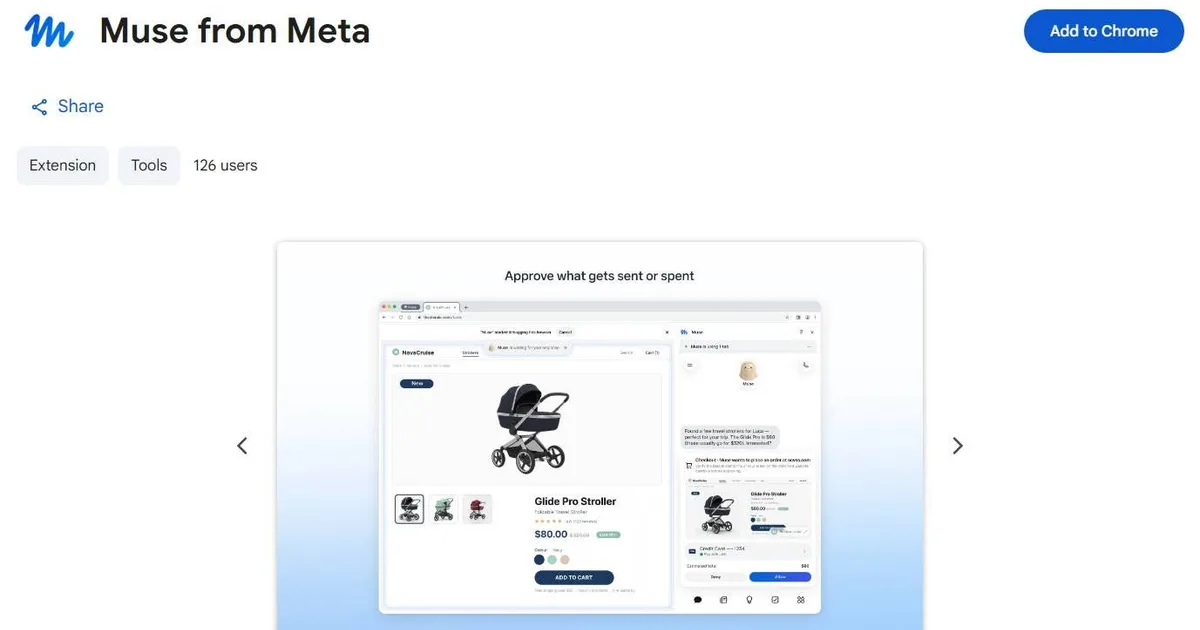
The official Muse extension is on the Chrome Web Store under the name "Muse from Meta". At the time of the post (13/11/2026), the store page screenshot showed 126 users.
Frequently asked questions
1. What is the Muse Chrome Extension? According to the post, it is Muse's official extension on the Chrome Web Store, letting the AI agent operate directly inside the Chrome browser on the user's computer instead of only working in a cloud browser on a remote server.
2. Why do websites often block or ask AI on the cloud for verification? According to the post, a cloud browser accesses websites from a datacenter IP, which many security systems treat as a sign of automated traffic — so the session is scrutinized more closely, asked for verification, or blocked.
3. What tasks does the extension help with? According to the post, tasks such as posting products to a website, updating information in an admin page, or completing multi-step forms — tasks that previously often hit re-login, CAPTCHA, or uncompletable actions on the cloud.
4. Can the extension get past every anti-bot system? No. The post states plainly that anti-bot systems can still detect automated activity, even when the AI runs on a personal browser.
5. How do users control the AI on their own browser? According to the post, Muse requires permission for the tabs it wants to control, helping users monitor and control the scope of its activity. The author proposes the direction: users set up trusted websites themselves, while sensitive operations still need separate confirmation.
Source: post by Trần Mạnh Quân in the Muse AI Vietnam group (13/11/2026). The interpretations and descriptions in this article belong to the post's author and have not been independently verified by Wotech. Extension link from the original post: https://chromewebstore.google.com/detail/muse-from-meta/jnakhhjmpmoohbjgfccbccfoifnmbdjd
Bài viết liên quan

18 tháng 11, 2026 · 6 phut doc
FPT Software Chairwoman: US Clients No Longer Want to Pay by the Hour, Company Shifts to Outcome-Based Pricing
Artificial intelligence is forcing FPT Software to transform its traditional software outsourcing model: large clients in the US now apply 100% outcome-based payment, and the company expects the Time…

18 tháng 11, 2026 · 6 phut doc
Meta Expands Muse to Australia: The 6th Country, Real-Time Voice, and Local App Integrations
On 17/11/2026, Meta expanded Muse to Australia — the 6th officially supported country, just over 2 months after its US launch. According to a post by Hồ Hoàng Tiến (18/11/2026), the notable point is …

18 tháng 11, 2026 · 7 phut doc
AI Agent Costs Grow With the Square of Steps: 4 Layers to Cut Token Spend Before Switching to a Cheaper Model
You don't pay for answers — you pay for how many times you re-ask the same thing. That is the central argument of Hoang Viet AI in a post in the comailo group (18/11/2026): an agent running 40 steps,…