Customer Management with Excel: Pros, Cons, and How to Manage Effectively | Wotech Electronics
Vũ Khôi
Tác giả tại Wotech Electronics Blog
Customer Management with Excel: Pros, Cons, and How to Manage Effectively
Vũ Khôi
Author at Wotech Electronics Blog
Customer management with Excel is one of the most common ways of storing customer information, used by most businesses. Alongside advantages such as low cost and ease of use, managing customers on Excel also has many limitations.
What Is Customer Management?
Customer management is the work of storing all information related to customers (name, date of birth, occupation, address, purchase history, etc.). Depending on their needs and customer base, businesses will have different storage methods and purposes.
In Vietnam, small and medium-sized businesses often use free customer management applications such as Excel or Google Sheets.
By storing detailed information about customers and analyzing their attributes, preferences, and consumer behavior, businesses can carry out marketing activities that meet their needs. In other words, the goal of customer management is to increase customer loyalty to the business, leading to sustainable profits.
Advantages of Managing Customers with Excel

Compared with traditional paper-based management, managing customers with Excel not only saves a great deal of time and effort but is also more accurate.
The first advantage of managing customers on Excel is cost savings. Excel is a convenient and free customer management application. Almost all computers come with this application pre-installed as bundled software, so businesses do not need to spend money on installing a system.
An Excel customer management file saves you from having to search through messy piles of paper to look up customer information. All customer data is managed centrally, serving purposes such as Customer Care, Marketing, Reporting, and more.
Excel's algorithms can help classify customers according to each of the business's purposes, making management easier and more convenient.
Besides that, Excel is such familiar software that most people know how to use it from their student days. So businesses will not spend much time instructing or training employees on how to use it.
How to Manage Customers on Excel Effectively
To manage customers with Excel effectively, users need to build an Excel template with the necessary information fields. Excel customer management files today are generally quite simple — businesses mostly keep all information on one sheet for general management. More complex files contain multiple sheets and columns with the most detailed information.
What Should an Excel Customer Management File Contain?
Depending on the products, services, and customer base a business targets, the Excel customer management file will contain detailed customer information. However, most customer management Excel templates need to include the following fields: Customer name, Company name, Contact phone number, Address, Email, Region, Customer status, Customer needs, Lead source, Account owner, etc.
Some Commonly Used Customer Management Excel Templates:
Simple customer management Excel template: This type contains only the most basic information staff need to collect about customers, such as: Name, phone number, address, company size, items of interest, etc.
Customer management Excel template with information and receivables: This template is dedicated to managing the information of customers with outstanding balances. Besides the basic information, it adds other fields such as: contract value, amount paid, and amount still owed, etc.
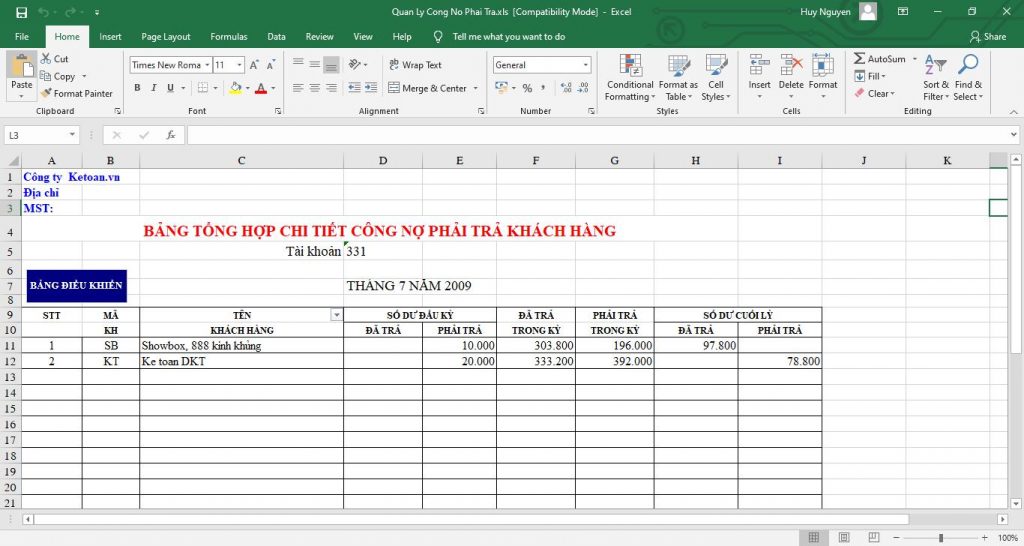
Customer potential assessment Excel template: With this template, businesses manage potential customers when they submit a registration form on the web or come from any funnel source (seeding, forums, Facebook ads, Google ads, etc.). Besides the basic information, this template includes more important, detailed fields: where the lead came from, what the customer's need is, who they are, what industry they work in, etc.
Is Managing Customers on Excel Really Effective?
There is no denying the benefits Excel brings to managing customer information: a completely free, simple, easy-to-operate application. However, alongside that, managing customers with Excel also has its limitations and shortcomings.

Low Security
When businesses use Excel for customer management, they must pay attention to managing and securing the Excel files. If you do not know the protective measures — such as protecting sheets and workbooks, locking cells, or setting access permissions — anyone can easily view, change, or delete the data. In other words, managing customers with Excel brings risks related to customer information security.
Because Excel is offline software, all your data is stored on the computer. Therefore, any computer problems — hardware failure or virus infection — will interrupt management. This leads to serious consequences: data loss and data gaps. In the worst case, all the data could be lost.
Scattered Data
With customer management in Excel, each salesperson directly manages their own customer file in a separate file. This makes the data scattered and inconsistent. In the end, statistics and consolidation take a lot of time to merge the data — with errors, even. Managers will face great difficulty evaluating and getting an overview of the work quality of each employee and their teams. As a result, planning marketing and customer care strategies is also delayed to some extent.
Limited Management Features
As free software, Excel has interface limitations and cannot manage customer relationships. It is simply a spreadsheet intended for tallying and calculating data. It does not include notification, reminder, appointment, or automated customer care features.
Tracking orders, customer transaction history, and employee work progress must all be done separately from Excel. This reduces the effectiveness of the sales department.
In addition, Excel has no ability to update data automatically, so information about customers or their purchase history can only be updated manually, which takes time.
Hard for Leadership to Track and Manage
Customer management with Excel does not support the sales team in exchanging information directly — interaction is poor. When a manager needs a report to consolidate data and get an overview, Excel cannot provide it instantly, affecting decision-making and business planning.
SimCRM – An Alternative to Managing Customers with Excel
At a larger scale, with higher customer management needs, Excel cannot meet a business's requirements. At such times, customer relationship management software is an effective choice.
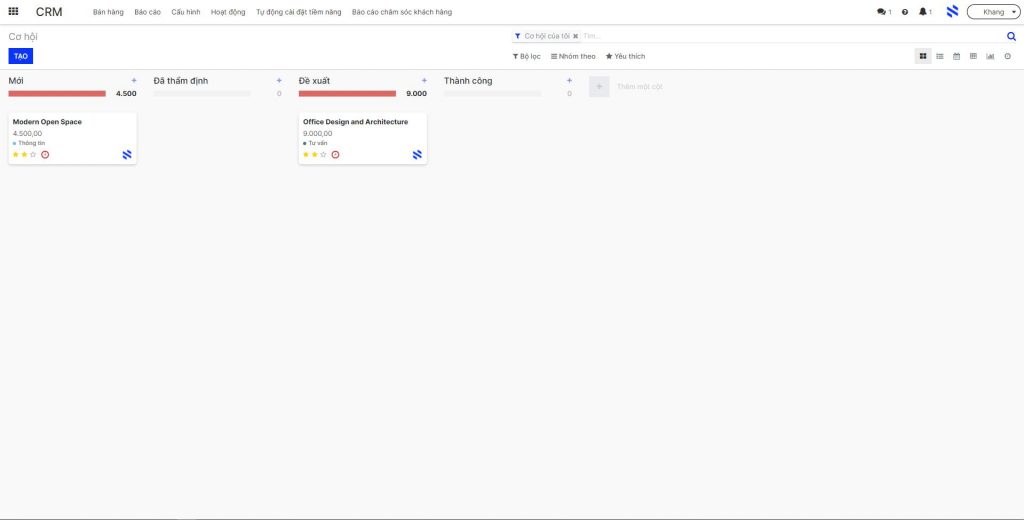
SimCRM is an enterprise resource planning software with an effective customer relationship management module. Simply put, through this software, businesses can manage their interactions with and care for their customers, forming loyal customer relationships within the enterprise.
Instead of manually managing customers with Excel, with SimCRM businesses can manage customers comprehensively and automatically. The software helps managers track potential customers, approach opportunities, care for customers, receive forecasts, and build effective marketing strategies through these useful features:
Opportunity Management
SimCRM's customer relationship management module lets users track, evaluate, and decide which leads will become opportunities:
-
Allows managers to add/edit/delete/group opportunities easily according to specific permissions.
-
Users can quickly track each stage with just a few drag-and-drop actions.
-
Connects and integrates with social applications such as Facebook, CallCenter, and SMS.
Customer Information Management
All information and customer care processes are stored in detail and updated in real time. Users can easily share and synchronize data.
-
Track, classify, and manage customer information centrally on a single system.
-
Track customer activities such as purchases, appointments, receivables, etc.
-
Includes tools for assessing each customer's potential.
-
Automatically assign the appropriate care staff to each customer segment.
-
Customize features to fit customers (language, shipping method, etc.).
-
Issue alerts for duplicate data cases to avoid duplication.
Automated Reporting
Notably, SimCRM supports automated report aggregation and statistics to improve business performance.
-
The software automatically reports in detail on customer care activities.
-
Tracks sales by country group/employee/sales team.
-
Tracks KPI progress in real time.
-
Analyzes reports to evaluate the metrics of Marketing campaigns.
From there, managers can propose business and marketing strategies or launch suitable, effective promotional programs.
Conclusion
Customer management with Excel may save money, but it reveals many limitations for businesses. Applying technology to customer management is necessary and increasingly common. SimCRM software is an optimal choice that helps businesses manage customers more effectively, thereby enhancing long-term profitability.
Related Articles
Bài viết liên quan

25 tháng 10, 2026 · 3 phut doc
2024年网页设计趋势预测如何? | Wotech Electronics
关于 2024 年网页设计趋势——步入 2024 年,年初正是我们为新事物预留时间的时刻。这也非常适合设计师群体唤醒我们内心的"艺术之魂"。闲话不多说,快来和 Markdao 一起浏览 2024 年的 UX/UI 设计趋势吧,说不定您就能为自己接下来的网页设计项目"迸发"出一个绝妙的点子呢!

25 tháng 10, 2026 · 1 phut doc
什么是网站(Website)?网站的详细定义及其带来的商业价值
什么是网站(https://www.markdao.com.vn/blog/website-la-gi)——这个问题或许已经无需定义,因为在如今这个信息时代,网站对每一家企业而言都是不可或缺的组成部分。正是网站帮助用户更近距离地接触企业所提供的产品和服务,从而提升经营效益。此外,要在当今竞争如此激烈的环境中求发展,网站是一个重要因素,它将带你走向品牌与销量上的双重成功。

25 tháng 10, 2026 · 1 phut doc
什么是SEO标准网站?一场"打赢"Google SEO标准的战役 | Wotech Electronics
99%的用户在购买前会先搜索信息,73%的用户只会访问排名前10的网站,并认定它们是值得信赖的品牌……在数字营销爆发的时代,这些数字有力地印证了SEO标准网站的重要性。然而,许多人对什么是SEO标准网站(https://www.markdao.com.vn/blog/huong-dan-toi-uu-seo-website-chuan-seo-on-page)仍然相当模糊,并未真正理解。达到SE…