
Top 10+ Best Remote and Online Meeting Software Today
Vũ Khôi
Tác giả tại Wotech Electronics Blog
Top 10+ Best Remote and Online Meeting Software Today
Vũ Khôi
Author at Wotech Electronics Blog
Covid-19 forced businesses to shift from traditional to remote work, helping managers maintain and even improve the productivity of business operations. Remote meetings are one of the first steps in digitally transforming the working model from in-person to online. However, the market today offers countless different remote meeting tools. How can a business choose the online meeting software that's right for it?
Below are recommendations for the most effective tools for organizing and managing online meetings today!
Google Meet

Microsoft Teams
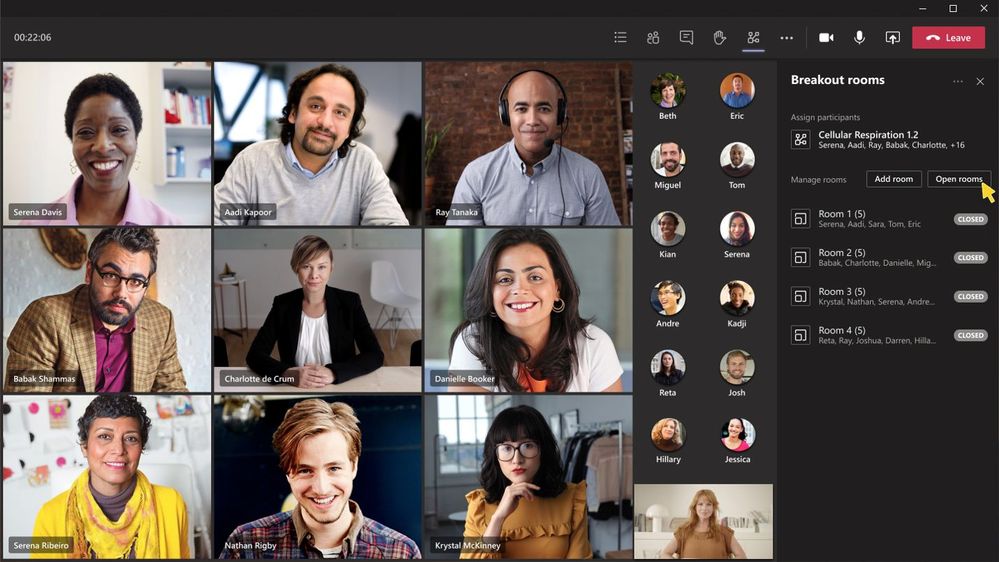
As a core application in the Office 365 suite, Microsoft Teams is highly rated and widely chosen by businesses for its seamless integration with other applications in the Microsoft ecosystem. Teams' core features include online meetings, chat, video calls, data sharing, and online teamwork.
Pros
-
The free version allows 150 participants per video meeting.
-
Free to use if you have an official Microsoft Office license.
-
Integrates and syncs with other Microsoft functions (Excel, Word, etc.).
-
Data is uploaded and stored on Microsoft's cloud platform.
-
Strong data encryption and security.
Cons
-
Limited to 100 people per meeting. Increasing the participant count requires a paid plan.
-
Microsoft Teams' interface isn't very user-friendly; it takes time to get used to.
-
Limited permission settings.
-
Requires an Outlook account for activities such as sharing documents and creating and checking team calendars in Outlook.
Price
Beyond the free plan, Microsoft Teams offers advanced plans with more features and higher attendance limits. Specifically:
-
Microsoft Teams Essentials: $2/user/month, allows 300 people per meeting.
-
Microsoft 365 Business Basic: $2.5/user/month with no attendance limit.
Zoom
Zoom is a popular remote meeting platform that makes it easy for users to connect and communicate online. It is widely used in businesses and even supports online learning at schools.
Pros
-
The free plan allows 100 people per meeting. With paid plans, businesses can raise attendance to 500 or even 1,000.
-
Sharp image and sound quality.
-
User-friendly: downloading, creating meetings, and joining remote meetings is simple and fast.
-
Many additional free features such as screen sharing, video annotations, meeting recording, and cloud storage.
Cons
-
High power consumption: while it doesn't use much memory, Zoom demands a considerable amount of power throughout use. Computers, phones, and laptops drain battery faster during Zoom meetings.
-
Performance issues: Zoom depends on internet connection and user bandwidth, requiring 600MB to 1.7GB of data per hour.
-
The free version only allows 40 minutes of online meeting time, which interrupts meetings.
Price
Beyond the free plan, Zoom offers advanced plans with more features and higher attendee and time limits. Specifically:
-
Zoom Pro: priced at $149.9/year/license: up to 100 participants.
-
Zoom Business: priced at $199.9/year/license: limited to 300 participants.
-
Zoom Enterprise: priced at $240/year/license: limited to 500 participants.
Skype
Microsoft Skype is an online meeting solution for voice calls, remote meetings, and video calls over the Internet. With this software, users can chat online, make calls, share files, video call, send voicemail, and more.
Pros
-
Displays user statuses: online, in a meeting, do not disturb, or offline.
-
Easy screen sharing and remote control of participants' screens.
-
Fast document sharing with remote meeting participants.
-
Records the entire meeting.
-
Email notifications when participants miss messages.
Cons
-
Prone to technical glitches.
-
Free Skype limits meetings to 25 participants — not suitable for large businesses.
-
Hard to get customer support from Skype.
Price
To raise attendance to 250 people, businesses must use Skype for Business. Specifically:
-
Skype for Business plan 1: priced at $2/user/month.
-
Skype for Business plan 2: priced at $5.5/user/month: adds several features such as livestreaming Skype meetings, meeting scheduling, and integration with online service providers, etc.
Zalo
Zalo is a popular social networking app on phones in Vietnam, which began as a free messaging app. Zalo lets users text, call, share images, videos, and files, and connect with one another. Zalo also allows users to hold remote meetings on both phones and the desktop app.
Pros
-
Simple sign-up with just a phone number.
-
Zalo is a free social app, so video calls and online meetings are all free.
-
Fast data sharing, up to 20MB per transfer. Senders can send multiple files at once.
-
Messaging with video and voice.
-
A friendly interface for Vietnamese users, with Vietnamese language support making it easy to use.
Cons
-
Online meetings only work through Zalo on desktop. On phones, you can only call 3 people.
-
Each online meeting allows a maximum of 10 people. That's why Zalo only suits small and micro businesses.
CISCO Webex Meetings
Although not as widely used as Zoom, Google Meet, or Skype, Cisco Webex Meetings is still highly rated by many businesses. The software comes with a full set of online meeting features, including messaging, document sharing, and online calls.
Pros
-
Joining a meeting is simple and fast — just enter the meeting link.
-
High security.
-
The free version is limited to 1 host and 100 participants.
-
Maximum meeting length of up to 24 hours.
-
Meetings continue even if the server loses connection or becomes unstable.
-
Business-friendly features included in the free version, such as waiting rooms, meeting lock, and unlimited document sharing.
Cons
-
Pricing is fairly high compared to heavyweight rivals like Zoom, Google Meet, and Skype.
-
Increasing hosts and participants requires paid plans.
Price
Beyond the free version, Webex offers several paid plans with more participants and richer features. Specifically:
-
Webex Starter costs $13.5/host/month, limited to 50 hosts and 150 participants.
-
Webex Business costs $26.9/host/month, allowing 100 hosts and 200 meeting participants.
-
Webex Enterprise has no limits on hosts or participants. For exact pricing, users need to contact the Webex team.
Lifesize
This is software built exclusively for online meetings, delivering high-quality telepresence meetings at the endpoint with lifelike audio and sharp video. Along with features like online meetings and messaging, users can adopt Lifesize's full solution package with hardware devices to support online meetings.
Pros
-
Fast link sharing and meeting joining.
-
All meetings and calls are encrypted and secure, fully protecting meeting information.
-
Allows livestreaming online meetings to social media platforms.
-
Administrators can easily evaluate results and manage online conferences through the Lifesize Admin Console.
-
Simple, user-friendly interface that's easy to use.
Cons
Only offers a 30-day trial rather than a feature-limited free version like other software.
Price
To increase attendance and unlock more features, users must move to a paid plan. Specifically:
-
Lifesize Plus costs $14.95/host/month, allowing 10 hosts and 300 meeting attendees.
-
Lifesize Enterprise costs $14.95/host/month, allowing 50 hosts and 500 meeting attendees. However, its features are not as complete as the Plus plan.
-
Lifesize Organization allows customizable features and attendee counts to fit company needs, with livestreaming for up to 10,000 viewers per event. This plan currently has no published price; you must contact Lifesize for a quote.
Gotomeeting
Gotomeeting is an app for setting up online meeting rooms aimed at business users. Users can share their webcam and images with others via computer. The app has several popular features such as meeting recording, admin rights sharing, and screen and data sharing.
Pros
-
Allows fast, easy meeting recording and archiving
-
Ability to share or transfer meeting admin rights to someone else.
-
Built-in drawing tool: users can mark up and draw on the call screen.
-
Meeting management through integrated tools and apps such as Outlook, Google Calendar, etc. You can set up and invite everyone according to a preset schedule.
-
With paid versions, users can host meetings of up to 3,000 attendees.
Cons
-
Gotomeeting only offers a 30-day free trial instead of a feature-limited free plan.
-
The free version only allows meetings of 3 people.
-
The software requires a strong, stable internet connection.
Price
Gotomeeting is priced fairly high compared to other online meeting software. It currently has 3 paid plans:
-
Professional plan: $12/organizer/month, allows 150 participants.
-
Business plan: $16/organizer/month, limited to 250 members.
-
Enterprise plan: limited to 1,000–3,000 members. For pricing, you need to contact Gotomeeting.
Free Conference

Free Conference Call is an online meeting tool that allows free voice calls and conference meetings. Despite being free software, FreeConference emphasizes security and commits to never sharing any user data. The software includes basic features such as creating meetings, free video or audio calls, and screen sharing.
Pros
-
Free video or audio calls for up to 100 people in HD quality.
-
Schedule calls and send invitations and reminders to participants.
-
Allows document and screen sharing, plus an online whiteboard for presentations.
-
Commits to protecting communications and personal information.
Cons
-
Occasional connection issues.
-
Call quality is still limited.
-
Limited number of people who can share meeting video.
Price
As its name suggests, FreeConference requires no payment. You can use all its features without spending anything on software.
Nextcloud Talk
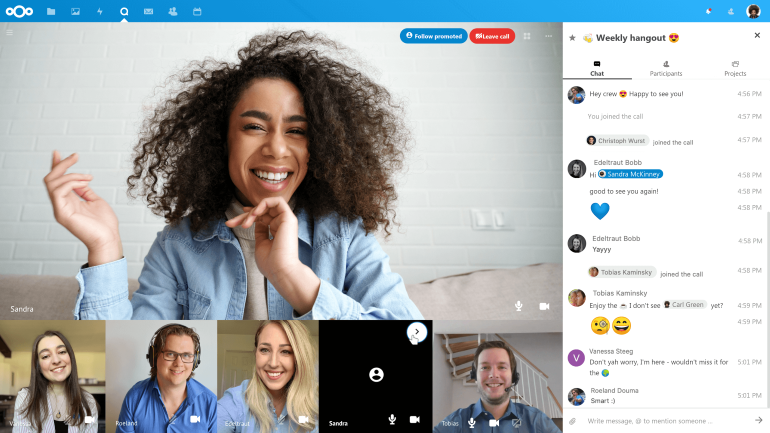
Nextcloud Talk is remote meeting software that lets users hold online meetings, webinars, and more within the Nextcloud system. Users can keep calls secure using video verification to identify callers.
Pros
-
Easy one-on-one or group conversations with customers and partners.
-
Join meetings easily via URL.
-
Exchange messages, links, and notes in the chat.
-
Data is organized into separate meeting rooms so participants can easily search for information.
-
Nextcloud Whiteboard lets participants present, brainstorm, take notes, and share images.
Cons
-
Deployment is complicated and time- and resource-consuming.
-
Difficulty getting service support.
-
Risks when scaling and upgrading the system.
Price
Private calls on Nextcloud Talk are completely free. However, to expand features and user counts, businesses must use the advanced plans:
-
100-user plan: $6.6/user/month.
-
500-user plan: $3.3/user/month.
Conclusion
Online meetings have become a popular choice for businesses — they save time and are convenient, allowing meetings to happen from many different locations. However, not every remote meeting tool meets a business's needs. Businesses therefore need to carefully consider their requirements and find out which software is the best fit.
We hope this article has helped you choose the optimal online meeting tool for your company.
Related Articles
Bài viết liên quan

25 tháng 10, 2026 · 3 phut doc
2024年网页设计趋势预测如何? | Wotech Electronics
关于 2024 年网页设计趋势——步入 2024 年,年初正是我们为新事物预留时间的时刻。这也非常适合设计师群体唤醒我们内心的"艺术之魂"。闲话不多说,快来和 Markdao 一起浏览 2024 年的 UX/UI 设计趋势吧,说不定您就能为自己接下来的网页设计项目"迸发"出一个绝妙的点子呢!

25 tháng 10, 2026 · 1 phut doc
什么是网站(Website)?网站的详细定义及其带来的商业价值
什么是网站(https://www.markdao.com.vn/blog/website-la-gi)——这个问题或许已经无需定义,因为在如今这个信息时代,网站对每一家企业而言都是不可或缺的组成部分。正是网站帮助用户更近距离地接触企业所提供的产品和服务,从而提升经营效益。此外,要在当今竞争如此激烈的环境中求发展,网站是一个重要因素,它将带你走向品牌与销量上的双重成功。

25 tháng 10, 2026 · 1 phut doc
什么是SEO标准网站?一场"打赢"Google SEO标准的战役 | Wotech Electronics
99%的用户在购买前会先搜索信息,73%的用户只会访问排名前10的网站,并认定它们是值得信赖的品牌……在数字营销爆发的时代,这些数字有力地印证了SEO标准网站的重要性。然而,许多人对什么是SEO标准网站(https://www.markdao.com.vn/blog/huong-dan-toi-uu-seo-website-chuan-seo-on-page)仍然相当模糊,并未真正理解。达到SE…