Vũ Khôi
Tác giả tại Wotech Electronics Blog
WHAT IS VCPU?
Vu Khoi
Author at Wotech Electronics Blog
I. Related Concepts You Should Know!
Contents
-
I. Related concepts you should know! 1. Hypervisor. 2. Socket 3. Processor. 4. Core. 5. Thread. 6. Logical Processor.
-
II. What is a vCPU?
-
III. How does a vCPU work?
Before learning what a vCPU is, let's cover the following basics:
1. Hypervisor.
A software program that manages one or more virtual servers (VPS). It is used to create, start, stop, and restart virtual machines, and so on. Hypervisors allow each VPS, or "guest," to access the underlying layer of physical hardware resources, such as CPU, RAM, and storage. They can also limit the amount of system resources each virtual machine can use so that multiple VMs can run simultaneously on one system.
2. Socket
When you see the term socket, I want you to think hardware. I want you to picture the number of sockets on a motherboard. A socket is a row of pins that holds the processor in place and connects the motherboard to the available processing power. The number of sockets is determined by the capacity of the motherboard.
Sockets differ depending on the CPU generation supported. For example: the Intel Silver 4110 CPU line runs on socket 3647.
3. Processor.
This is the physical component responsible for all processing operations.
You can refer to our overview article on CPUs for a deeper understanding.
4. Core.
What is a physical core? Inside your physical processor, you may have more than one operating unit, called a Core. Typically, you'll see 2, 4, or more cores listed in the specs (i.e., Dual Core, Quad Core, or more). A single physical core can correspond to one or more logical cores. We'll learn what a logical core is in the next section.
5. Thread.
What is a thread? Also called a "luồng" in Vietnamese, a thread is a path of execution within a process. A process contains one or more threads. The fundamental difference is that threads within the same process run in a shared memory space, while processes run in separate memory spaces.
A thread is also known as a lightweight process. Parallelism means splitting a process into multiple threads. For example, opening multiple tabs in a browser represents different threads. For word processing, there may be multiple threads — for instance, one thread to format the text and another to handle input.
6. Logical Processor.
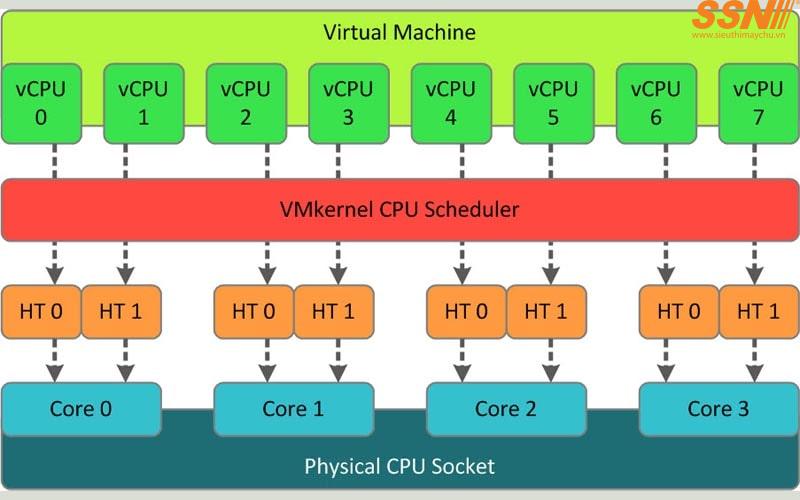
As explained above, we have a processor and cores. Typically, a Core can handle one thread (i.e., one operation) at a time (the processor's time slice). But when Hyper-Threading technology is enabled and supported, a Core can process two threads at the same time (more complex than that, but I'm touching on the point). The maximum number of threads running in a machine is the number of logical processors. So if you want to know how many logical processors you have, just count the total number of threads.
For example, one core can handle 1 thread at a time.
So if I have a dual-core processor (i.e., 2 cores), my system can handle:
2 cores = 2 threads = 2 Logical Processors.
But with hyper-threading, each core can handle dual requests, i.e., 2 threads at the same time.
2 cores = 4 threads (2 threads per core) = 4 Logical Processors
The same concept continues to scale for processors with more cores.
II. What Is a vCPU?
-
vCPU is the abbreviation for virtual Central Processing Unit. By definition, a vCPU represents a portion or part of a physical CPU that is essentially assigned to a specific virtual machine (VM).
-
A vCPU is a virtual CPU created and assigned to a virtual machine or virtualization software by a hypervisor. It represents a software implementation of a physical CPU that does not exist as an actual physical CPU, but the OS treats it as a real one.
-
vCPU, or virtual Central Processing Unit, is understood as a virtual central processing unit — the central processing unit found in virtual machines and cloud environments. As virtualization technology continues to advance, virtual machines have become the top choice for many businesses looking to save space, time, and money on management.
-
Virtual machines allow users to run multiple operating systems on a single physical machine. However, to do that, the vCPU is an indispensable component.
Each VM in a cloud environment has at least one vCPU. This is made possible by using physical CPUs as virtual CPUs on the server and hosting multiple VMs on it.
One of the main features of the vCPU is that it allows multiple virtual machines to share the server's physical resources, including CPU, memory, storage, and so on.
A vCPU works by occupying a number of time slots across all the physical CPU cores available on the server. That means a vCPU does not reflect a 1:1 allocation of physical CPU core resources. In addition, because of the distribution across multiple cores, a vCPU can potentially be utilized better than a single physical CPU core.
The hypervisor determines the time slots a vCPU occupies and which CPU cores are currently assigned to the vCPU. This kind of resource distribution allows multiple virtual machines to be hosted on a limited number of physical cores. How many vCPUs are in a CPU?
Modern CPUs are built on integrated-circuit microprocessors containing one or more cores.
Chips with multiple cores are called multi-core processors, and the individual cores have multiple logical cores, all of which are used to create vCPUs.
A physical core can usually run two threads, meaning it has two logical cores.
This is called Hyper-Threading, and it provides more computing power while also allowing more virtual machines to run simultaneously. Considering all of the above, the number of vCPUs in a server mainly depends on the following: the number of physical CPUs in the server.
There is usually one CPU per machine, but modern data centers can have single- and dual-processor servers.
- The number of CPU cores.
A CPU core is a processor embedded in the CPU chip, and each core can execute and process tasks independently at the same time. Modern CPUs have up to 64 cores running 128 threads.
- The number of CPU threads.
A thread is a set of instructions that allows a CPU core to be split into multiple virtual (logical) cores to increase performance. A CPU core typically has two threads. AMD uses multithreading, while Intel uses Hyper-Threading.
Refer to the section below to calculate how many vCPUs you need for a virtual machine and the maximum number of vCPUs your system supports.
III. How Does a vCPU Work?
In virtualization, when you create a virtual server, you assign a processor to it — required for the VM to run and perform its operations — with resources allocated and controlled by what is called a hypervisor.
Just like vRAM, VHD, and virtual network interfaces, we also assign a virtual processor (vCPU) to the virtual machine. Simply put, it is a time slot of the physical processor that will be granted to the VM.
So when I assign a virtual processor to a virtual machine, it is like I am renting computing time from the processor — a portion of the processor.
The hypervisor takes a portion of the physical CPU's computing resources and allocates it to the vCPU assigned to a specific virtual machine. System administrators can use the hypervisor to set up different resource allocations, in which specific VMs are configured with specific vCPU capabilities.
This feature allows several virtual machines to run on a machine, for example one with only two physical CPU cores.
How many vCPUs do I need, and how do I calculate it?
The maximum number of vCPUs in a system depends on the CPU type and the virtualization vendor.
The number of vCPUs is calculated by taking the number of processing threads per core and multiplying it by the number of cores and CPU sockets used. Therefore, the formula for calculating the number of vCPUs is:
(Threads x Cores) x Physical CPUs = Number of vCPUs
Example of Calculating vCPUs & Cores
The best way to learn how to calculate vCPUs and cores is to demonstrate it with an example.
First, we need to pick a virtual server and a CPU. For this example, we'll choose the Intel Xeon E-2288G sold by wotech.vn as the base CPU. The key specs of the Intel Xeon E-2288G include 8 cores / 16 threads with a base clock of 3.7 GHz and a turbo speed of 5.0 GHz. It has 16MB of on-board cache.
(16 threads x 8 cores) x 1 CPU = 128 vCPUs
(16 Threads x 8 Cores) x 1 CPU = 128 vCPUs
Determining Your Workload and Usage
That's not all. How do you know where to start? First, you need to know your workload and application profile. We can help you analyze this. Click here to contact us.
Some questions to consider before you begin? Do your applications always run at 100% CPU utilization? By knowing your requirements, you can make informed decisions about the underlying hardware.
In theory, if you have small VMs that barely use any CPU time, you could easily get 20–30 virtual machines from an 8-core server. However, if you have heavier workloads such as database servers, you'll get fewer VMs from that same 8-core server. It's all about usage and resource allocation.
Next, let's look at some different configuration options. We're doing this purely as an example, and your vCPU allocation per VM will depend on your specific workload.
4 vCPUs per VM 128 vCPUs / 4 vCPUs per VM = 32 VMs
2 vCPUs per VM 128 vCPUs / 2 vCPUs per VM = 64 VMs
1 vCPU per VM 128 vCPUs / 1 vCPU per VM = 128 VMs
CPU Exhaustion and Poor Performance
One thing, for example — CPU exhaustion — can cause poor performance for your virtual machines. The number of virtual cores assigned to a VM is limited.
For example: Windows Server 2008 R2 limits the number of vCPUs to 4 per VM, a limit raised to 64 in Windows Server 2012.
Related Articles
Bài viết liên quan

25 tháng 10, 2026 · 3 phut doc
2024年网页设计趋势预测如何? | Wotech Electronics
关于 2024 年网页设计趋势——步入 2024 年,年初正是我们为新事物预留时间的时刻。这也非常适合设计师群体唤醒我们内心的"艺术之魂"。闲话不多说,快来和 Markdao 一起浏览 2024 年的 UX/UI 设计趋势吧,说不定您就能为自己接下来的网页设计项目"迸发"出一个绝妙的点子呢!

25 tháng 10, 2026 · 1 phut doc
什么是网站(Website)?网站的详细定义及其带来的商业价值
什么是网站(https://www.markdao.com.vn/blog/website-la-gi)——这个问题或许已经无需定义,因为在如今这个信息时代,网站对每一家企业而言都是不可或缺的组成部分。正是网站帮助用户更近距离地接触企业所提供的产品和服务,从而提升经营效益。此外,要在当今竞争如此激烈的环境中求发展,网站是一个重要因素,它将带你走向品牌与销量上的双重成功。

25 tháng 10, 2026 · 1 phut doc
什么是SEO标准网站?一场"打赢"Google SEO标准的战役 | Wotech Electronics
99%的用户在购买前会先搜索信息,73%的用户只会访问排名前10的网站,并认定它们是值得信赖的品牌……在数字营销爆发的时代,这些数字有力地印证了SEO标准网站的重要性。然而,许多人对什么是SEO标准网站(https://www.markdao.com.vn/blog/huong-dan-toi-uu-seo-website-chuan-seo-on-page)仍然相当模糊,并未真正理解。达到SE…